Build an LLM wiki from your PDFs
To build an LLM wiki from PDFs in Mempipe, upload the PDFs to a raw folder in a Space. Then ask Claude Code or Codex, connected to the Space over MCP, to save cited Markdown pages in a wiki folder. Then save the agent’s rules in AGENTS.md, so every later session starts from the same rules. A valid citation in a saved page opens the passage it cites in the PDF.
New to the idea? Read What is an LLM wiki? first. New to Mempipe? Start with Ask questions about a PDF and get cited answers.
Before you start
Section titled “Before you start”- A Space. The Free plan is enough. See Create a Mempipe account.
- Claude Code or Codex, connected to the Space with write access. Build an LLM wiki with Claude Code or Codex shows how to connect.
- One or more PDFs. Each file must be within your plan’s per-file limit: 32 MB on Free and 64 MB on Starter. Markdown files work as sources too.
Start in a new Space, so the agent can’t change notes you care about. In a Space you already use, the agent can create and replace Markdown files in any folder, so tell it to leave your other files unchanged.
Build the wiki
Section titled “Build the wiki”-
Upload your PDFs to a
rawfolder.In Files, choose New folder and name it
raw. Withrawselected, choose Upload file and pick your PDFs. You can also drag the files onto the folder. See Upload files to a Space. -
Wait until each file is ready.
Mempipe processes each PDF so it can be read, searched, and cited. While it works, Deriving… shows beside the file. When it finishes, the file shows Ready for a few seconds. This usually takes under a minute, and longer for a long PDF. See What happens after you upload a file.
-
Ask the agent for the first pages.
In Claude Code or Codex, copy this prompt, and replace the server name, file name and topic with your own:
Use the mempipe-<org>-<space> MCP server.Read raw/my-document.pdf. Check for existing wiki/ pages and readthem before making changes.Save the key points about [topic] in wiki/overview.md. Cite each claimwith a citation link returned by the Mempipe tools, copied exactly.Keep useful findings and open questions.Create or update wiki/index.md with links to the pages and sources.Write each link as a wiki link, such as [[overview]].Append a short entry to wiki/log.md without inventing a date.Keep raw/ unchanged. Make uncertainty and conflicting evidence clear.For more than one PDF, name each one in the prompt. A first wiki can take several minutes. The agent shows each Mempipe tool it calls, including a write_file call for every page it saves. It creates the
wikifolder itself. -
Read the pages it saved.
Open the Space in Mempipe. If it was already open, reload the page to see the new pages in Files. Open
wiki/index.mdand follow its link to the overview. Opening a citation shows the passage behind that sentence, as Open a citation and check its source explains. Open the citations behind the claims you plan to rely on. If a claim is wrong or has no citation, ask the agent to correct the page, then open it again. -
Save the rules in
AGENTS.md.Ask the agent to save the wiki’s rules, so later sessions get them without you repeating them:
Save these rules in AGENTS.md at the top level of the Space. IfAGENTS.md already exists, read it first and add the rules to it.Read wiki/index.md and relevant pages before answering or editing.Keep raw/ unchanged. Maintain knowledge in wiki/ as Markdown.Link wiki pages with wiki links, such as [[overview]].Use source citations returned by your tools. Distinguish facts frominference and keep unresolved conflicts visible.Update the index when needed and append maintenance notes to wiki/log.md.Do not invent dates.Claude Code and Codex read instruction files from your computer, not from the Space, so start each session by asking the agent to read the Space’s
AGENTS.md. Open it in Files to check what was saved.
What you should see
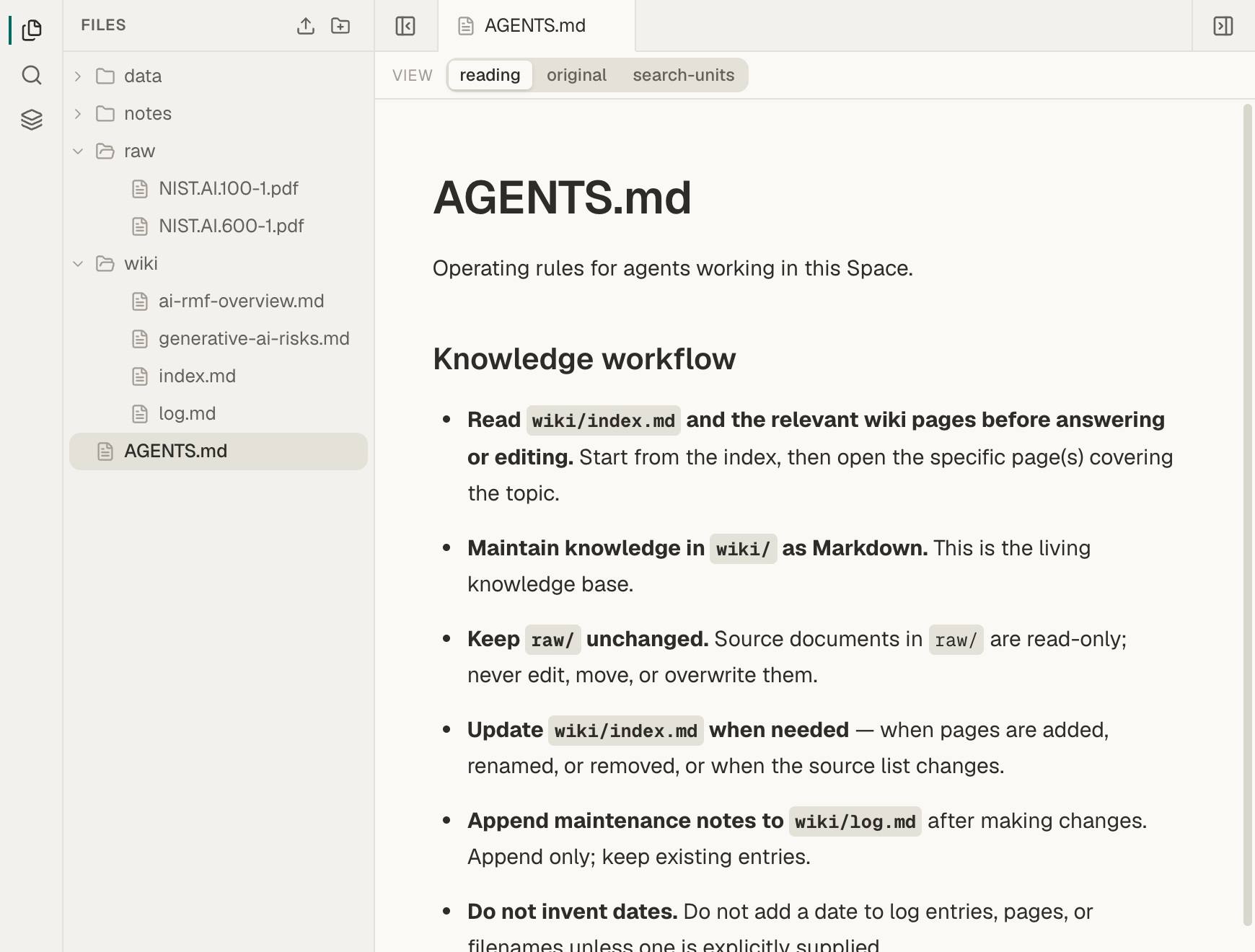
Section titled “What you should see”Files shows AGENTS.md at the top level, your PDFs in raw, and index.md, log.md, and overview.md in wiki. The overview is an ordinary Markdown page. Its citations are links to Mempipe. Opening one shows the passage behind that sentence.
If something goes wrong
Section titled “If something goes wrong”- No pages appear. Look in the agent’s output for a write_file call that failed. Ask the agent to save to the exact
wiki/paths, then reload Files. - The agent says a file is not ready, or finds nothing in it. Wait until the file has been processed, then ask again. If processing failed, the file shows Derive failed or Search failed. See A file is stuck processing or failed.
- The agent says it cannot write, or cannot find the Mempipe server. See If something goes wrong in the Claude Code and Codex guide.
- A save is refused because the page changed. Someone edited the page after the agent read it. Ask the agent to read the page again and redo its change.
- An upload is refused. The file may be over your plan’s per-file limit, or the organization may have run out of storage or files. See You reached a storage, file, or Space limit.
Still stuck? Email hello@mempipe.ai with the file name and what you saw.
Next steps
Section titled “Next steps”- Update your LLM wiki when you add sources, and save useful answers back into it.
- Check an AI-written wiki against its sources before you rely on it.
- Connect your own AI to ask questions about the wiki from another tool.