Search, grep, and glob syntax
Mempipe’s Search panel has three modes, and each reads what you type differently. BM25 takes plain words and ranks the passages that contain them. It has no special syntax. Grep takes exact text, or a regular expression while Regex is on, and checks each line of each passage. Glob takes a pattern such as raw/**/*.pdf, which must match a file’s whole path.
BM25 and Grep search the text of PDF and Markdown files that have finished processing. Glob searches the names of every file. Search inside your PDFs and Markdown files shows how to use the panel.
Type the words you expect to find in the passage, such as risk tolerance.
- Any of your words can match. A passage needs only one of them. Passages with more of your words, and with rarer words, rank higher.
- Case and accents don’t matter.
Riskfinds “risk”, andcafefinds “café”. - Word endings don’t matter.
risksalso finds “risk” and “risking”. - Common English words are ignored, such as “the”, “and”, “or”, “not”, and “all”. A query made only of such words finds nothing.
- Punctuation splits words.
third-partylooks for “third” and “party”. - There is no other syntax. Quotes,
AND,OR,NOT,+,-, and*have no effect. To find an exact phrase, use Grep.
BM25 matches words, not meanings, and it handles word endings and common words as English does, whatever the document’s language. For text written without spaces between words, such as Chinese or Japanese, use Grep.
A higher score means a closer match. Compare scores only within one search. BM25 shows up to 100 results a page, and 1,000 in all.
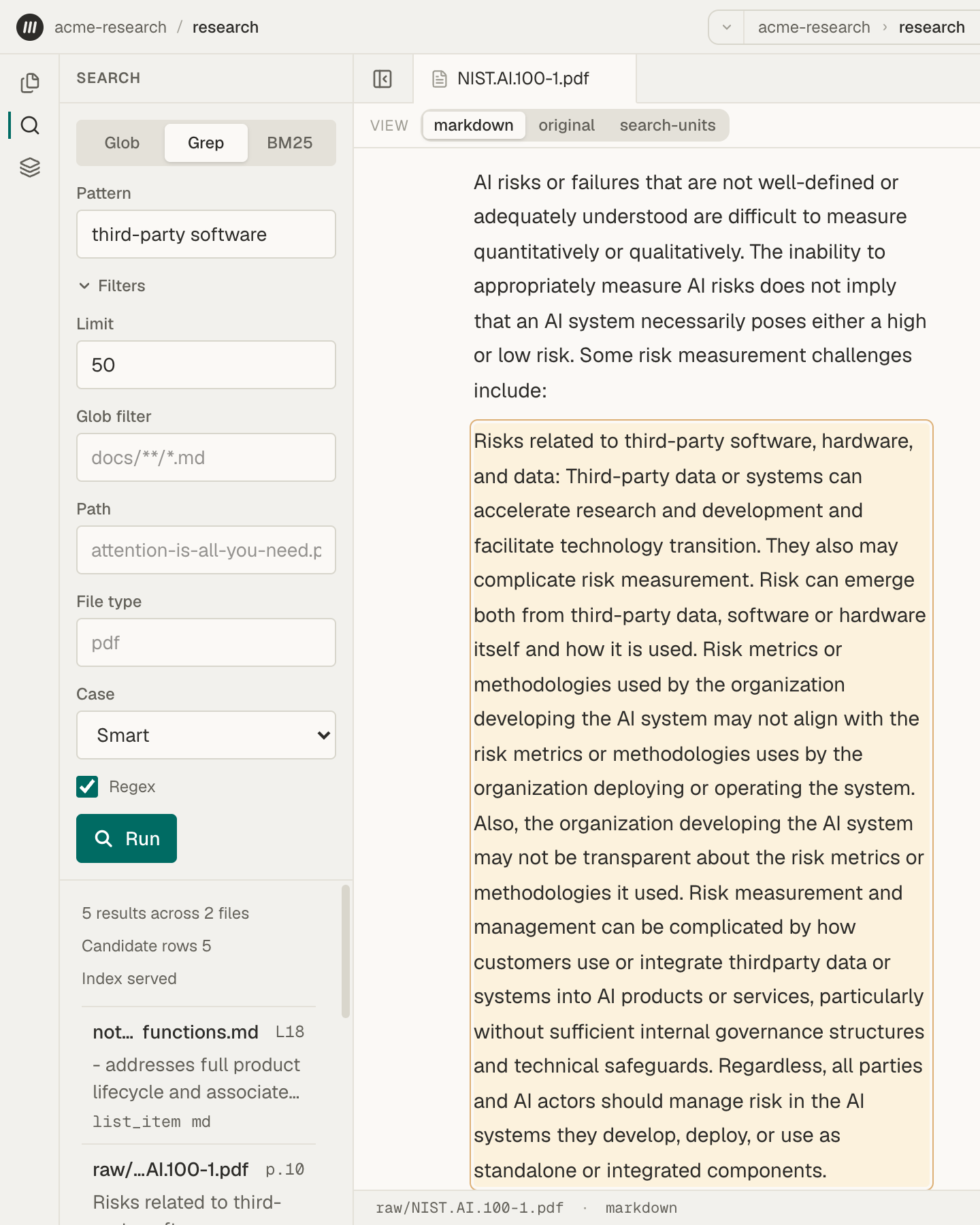
Grep lists every passage that contains a match, sorted by file path and then by position in the file. Choose Filters to set Regex and Case. Regex is on when the panel opens.
Exact text
Section titled “Exact text”With Regex off, Grep finds your text exactly as typed, anywhere in a line. bias also finds “biased”. Spaces at the start or end of the pattern are removed.
Letter case
Section titled “Letter case”- Smart, the default, ignores case when the pattern has no capital letters, and matches case exactly when it has one.
- Sensitive always matches case exactly.
- Insensitive never does.
Ignoring case doesn’t ignore accents. cafe doesn’t find “café”.
Regular expressions
Section titled “Regular expressions”With Regex on, the pattern is a regular expression. These are the most useful parts:
| Syntax | Matches |
|---|---|
. |
Any one character |
*, +, ? |
The item before it, repeated zero or more times, one or more times, or zero or one time |
{2,4} |
The item before it, two to four times |
[abc], [a-z] |
One of the listed characters, or one in the range |
[^abc] |
One character that isn’t listed |
\d, \w, \s |
A digit, a letter or digit or _, or a space or tab |
\b |
The edge of a word |
^, $ |
The start or end of a line |
cat|dog |
Either side of the | |
( ) |
A group, such as risk (tolerance|appetite) |
\. |
A literal dot. Put \ before any of . * + ? ( ) [ ] { } | \ ^ $ to match it as text. |
(?i) |
Ignore case from this point |
Grep doesn’t support lookahead or lookbehind, such as (?=…), or back-references, such as \1. Letters and digits in \w, \d, and \b include other alphabets.
What Grep reads
Section titled “What Grep reads”Grep checks each line of a passage on its own. A match can’t run across two lines, and ^ and $ mark the start and end of each line.
It reads the passage as Markdown, so formatting marks are part of the text. A heading starts with #, so ^## finds second-level headings. Bold text is written **like this**, and a link includes its web address. Mempipe writes this Markdown in one standard form, so a note’s __bold__ is read as **bold** and its * bullets as -.
A pattern needs some fixed text
Section titled “A pattern needs some fixed text”To search the whole Space, a pattern must include fixed text that every match contains: three or more letters or digits in a row, or a punctuation mark, space, or character from another alphabet. \bbias\b works because of “bias”. \d+% works because of the %. \d{4} alone doesn’t, and Grep says pattern has no index-servable literal.
To search with a pattern like that, fill in Glob filter, Path, or File type. A Glob filter of ** searches every file.
Filters
Section titled “Filters”- Glob filter takes a pattern with the same syntax as Glob mode, below.
- Path takes one file’s full path, such as
raw/NIST.AI.100-1.pdf, with the same letter case and no/at the start. - File type takes the extension in lowercase, without the dot, such as
pdformd. A.markdownfile’s type ismarkdown. - Limit sets how many results a page shows, up to 1,000.
Path and File type work the same way in BM25.
A glob pattern must match a file’s whole path, from the top of the Space.
| Syntax | Matches |
|---|---|
* |
Any characters within one file or folder name, including none |
** |
Any number of folders, including none, when it stands alone between slashes, as in raw/**/*.pdf |
? |
Exactly one character, other than / |
[abc], [a-z] |
One of the listed characters, or one in the range |
[!abc] or [^abc] |
One character that isn’t listed |
{pdf,md} |
Any one of the choices |
\* |
A literal *. Put \ before any special character to match it as text. |
- Letter case must match.
*.PDFdoesn’t findreport.pdf. - Start from the top of the Space.
*.pdffinds only PDFs at the top level.**/*.pdffinds every PDF, at the top level too. A/at the start is ignored, but a pattern that starts with./finds nothing. **inside a name acts like*.raw/**.pdffinds only the PDFs directly insideraw.- A pattern with no special characters finds that one path.
- Glob finds files, not folders. To list a folder’s files, use a pattern such as
raw/**.
Results are sorted by path. The panel shows 50 files to start. Choose Filters and raise Limit, up to 1,000, to see more. If the pattern has a mistake, such as a [ with no ], the panel shows an error that ends in returned 422. Check the pattern’s brackets and braces.
| Pattern | Finds |
|---|---|
**/*.md |
Every .md file |
wiki/*.md |
Markdown files directly inside wiki |
raw/** |
Every file in raw and its subfolders |
**/*.{csv,tsv} |
Every CSV and TSV file |
**/NIST.AI.???-1.pdf |
NIST.AI.100-1.pdf and NIST.AI.600-1.pdf, in any folder |
**/[!_]* |
Every file whose name doesn’t start with _ |
Find a file by name shows how to use Glob mode.
When an agent searches
Section titled “When an agent searches”The in-app agent and connected AI apps use the same three kinds of search, with the same rules. A connected app can also narrow a BM25 search with a glob pattern, which the panel can’t. The in-app agent’s grep matches exact text unless the agent asks for a regular expression. A connected app’s grep reads a regular expression unless the app asks for exact text.