Supported file types and size limits
You can upload any type of file to a Mempipe Space, up to 32 MB per file on the Free plan and 64 MB on Starter. Mempipe processes four types. PDF and Markdown files become text you can read, search, and cite. CSV and TSV files become tables you can sort, filter, and query with SQL. Other text files open in a text editor, and every other file is stored exactly as you uploaded it.
File types
Section titled “File types”Mempipe decides how to open a file from its extension, so keep the extension when you rename a file.
| File | Extensions | What you get |
|---|---|---|
.pdf |
The PDF itself, and a markdown view of its extracted text, with headings, tables, and figures | |
| Markdown | .md, .markdown |
A formatted reading view with working links, and the text to edit |
| CSV, TSV | .csv, .tsv |
tables, schema, and query views, and the text to edit |
| SQL query | .sql |
A query view that runs the query each time you open it |
| Chart | .vl.json |
A visualization view that draws the chart |
| Other text | .txt, .json, .yaml, .yml, .xml, .ndjson |
The text, to read and edit |
| Anything else | such as images, Word, Excel, and PowerPoint files | Stored and listed in Files, but not shown |
Search covers PDF and Markdown files only. CSV and TSV files are queried with SQL instead.
Opening a file Mempipe can’t show says No preview available for this file type. So does a chart file’s original view: Mempipe draws the chart, but can’t show its text. To use a Word document or a slide deck, save it as a PDF first. To use a spreadsheet, save each sheet as a CSV file.
What happens after you upload a file explains processing, and Search inside your PDFs and Markdown files explains what search covers.
Plan limits
Section titled “Plan limits”Each organization’s plan limits what all its Spaces hold together.
| Limit | Free | Starter |
|---|---|---|
| Size of one file | 32 MB | 64 MB |
| Storage, shared by all Spaces | 200 MB | 1 GB |
| Files and folders, across all Spaces | 100 | 500 |
| Spaces | 2 | 10 |
- Size of one file applies to each upload and to each new version of a file. It counts 1 MB as 1,048,576 bytes.
- Storage counts the files you upload and save. It counts 1 MB as 1,000,000 bytes. The text Mempipe extracts, search indexes, and deleted files don’t count.
- Files and folders counts every file and every folder, including the folders a folder upload creates.
No plan accepts a file larger than 128 MiB, about 134 MB. The upload panel then says the maximum upload size is 128.0 MiB.
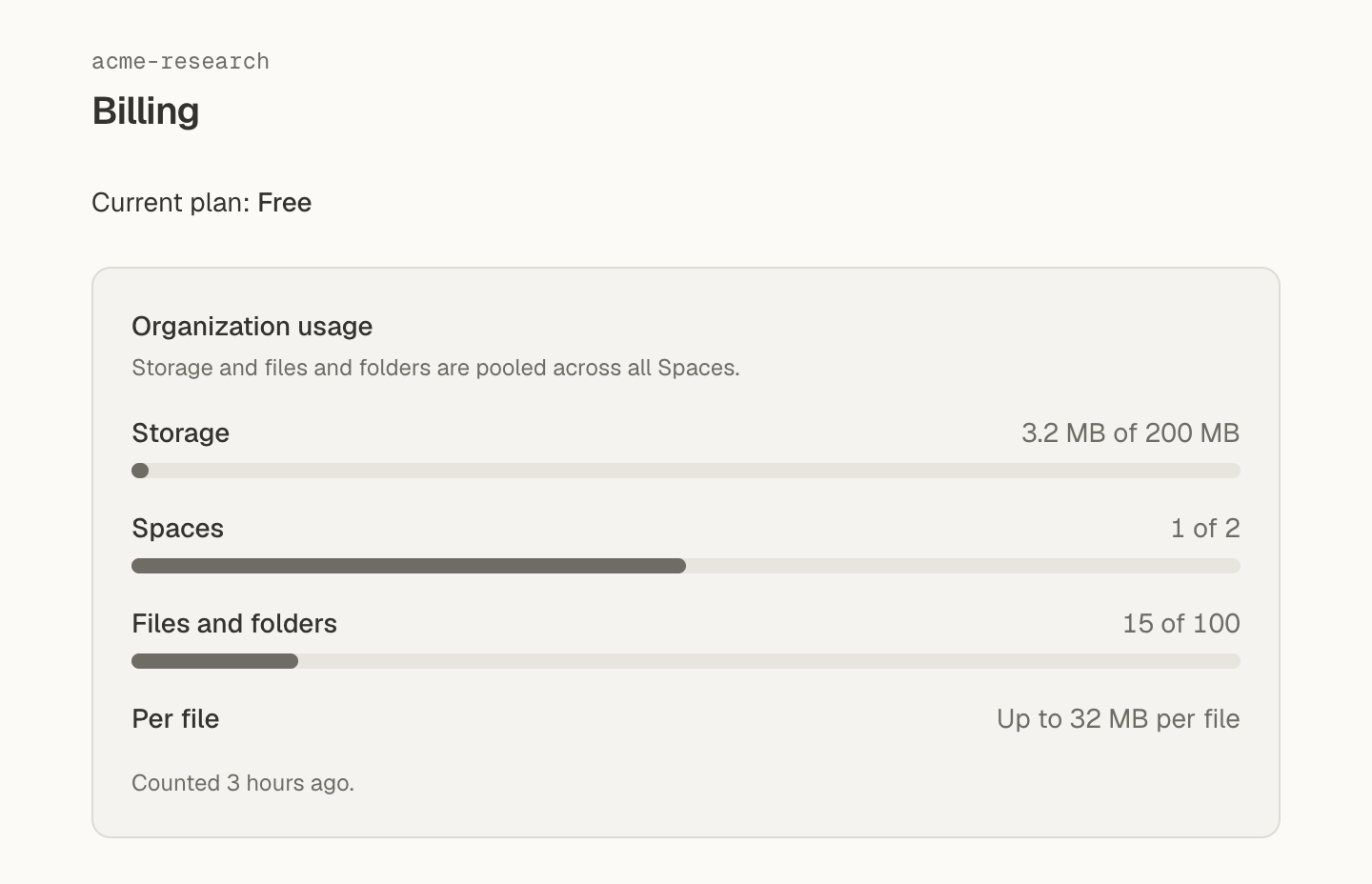
Your organization’s own limits, which can be higher than these, are on its Billing page under Organization usage. Plans, usage limits, and upgrading shows how to open it and how to upgrade. You reached a storage, file, or Space limit explains each limit message. Pricing compares the plans.
PDF files
Section titled “PDF files”- Mempipe extracts the text with Docling unless you choose LlamaParse for that PDF. Choose an extractor explains the difference.
- Docling also reads the text in scanned pages. Check the markdown view of a scanned PDF before you rely on it.
- There is no page limit, but Docling stops working on a PDF after 30 minutes. A very long PDF can fail for that reason. A file is stuck processing or failed explains what to do.
- Remove any password from a PDF before you upload it.
CSV and TSV files
Section titled “CSV and TSV files”- Save the file as UTF-8 text. In Excel, choose CSV UTF-8 when you save.
- Mempipe finds the separator and the header row itself, so a TSV file can use the
.csvextension and still work. - Each file becomes one table. A row with fewer values than the header is filled out with empty values.
- Each line must end with a line break or with Windows line endings. A file from an old Mac program that ends lines with a carriage return alone fails.
- A file can have up to 6,000,000 lines.
Open a CSV file as a table and Query CSV files with SQL cover what you can do with the table.
Images
Section titled “Images”Mempipe can’t show an image file you upload, and a note can’t show an image stored in the Space. A PDF’s figures show in its markdown view. A Markdown note shows an image from the web, written with its full address, such as .
File and folder names
Section titled “File and folder names”- A name can’t be empty, can’t contain
/, and can’t be.or... - Two items in the same folder can’t have the same name.
- Names are case-sensitive.
Notes.mdandnotes.mdare two different files, and both can be in one folder. A wiki link to a bare name, such as[[notes]], ignores case when it looks for the file. A link with a folder in it, such as[[wiki/notes]], doesn’t. - A folder upload skips the system files
.DS_Store,Thumbs.db, anddesktop.ini.
Create folders and rename, move, or delete files shows how to name and rename files.
Other limits
Section titled “Other limits”| What | Limit |
|---|---|
| Rows in a CSV file’s tables view | The first 10,000. A SQL query reads every row. |
| Rows in a SQL query’s result | 10,000 |
| A SQL query | 16 KB long, up to 8 files, 5 seconds to run, and a result under 8 MB |
AGENTS.md |
The in-app agent reads the first 16,000 characters. |
| A file the in-app agent or a connected AI app saves | 256 KB, and only a .md, .sql, or .vl.json file |
| Files listed in the ⌘K palette | The first 200 in the Space |
| BM25 results | 100 per page, and 1,000 in all |
| Grep and Glob results | 1,000 per page |
Take files out of Mempipe
Section titled “Take files out of Mempipe”Files have no download button. To take a file’s content out:
- Markdown, SQL, CSV, and other text files. Open the file’s original view, select all of its text, and copy it.
- A PDF’s text. Open its markdown view, select the text, and copy it. You get the text as it reads on screen, not its Markdown source.
- A PDF itself. In its markdown view, ⌘-click, or Ctrl-click, a page chip. The original PDF opens in a new browser tab, where you can save it.
- Through an AI app. A connected AI app can read the text files and PDFs in the Space and pass their content on.
Files Mempipe can’t show, such as PNG images, can’t be taken out. A connected AI app can still read one that holds plain text, such as an SVG image.