What is Mempipe?
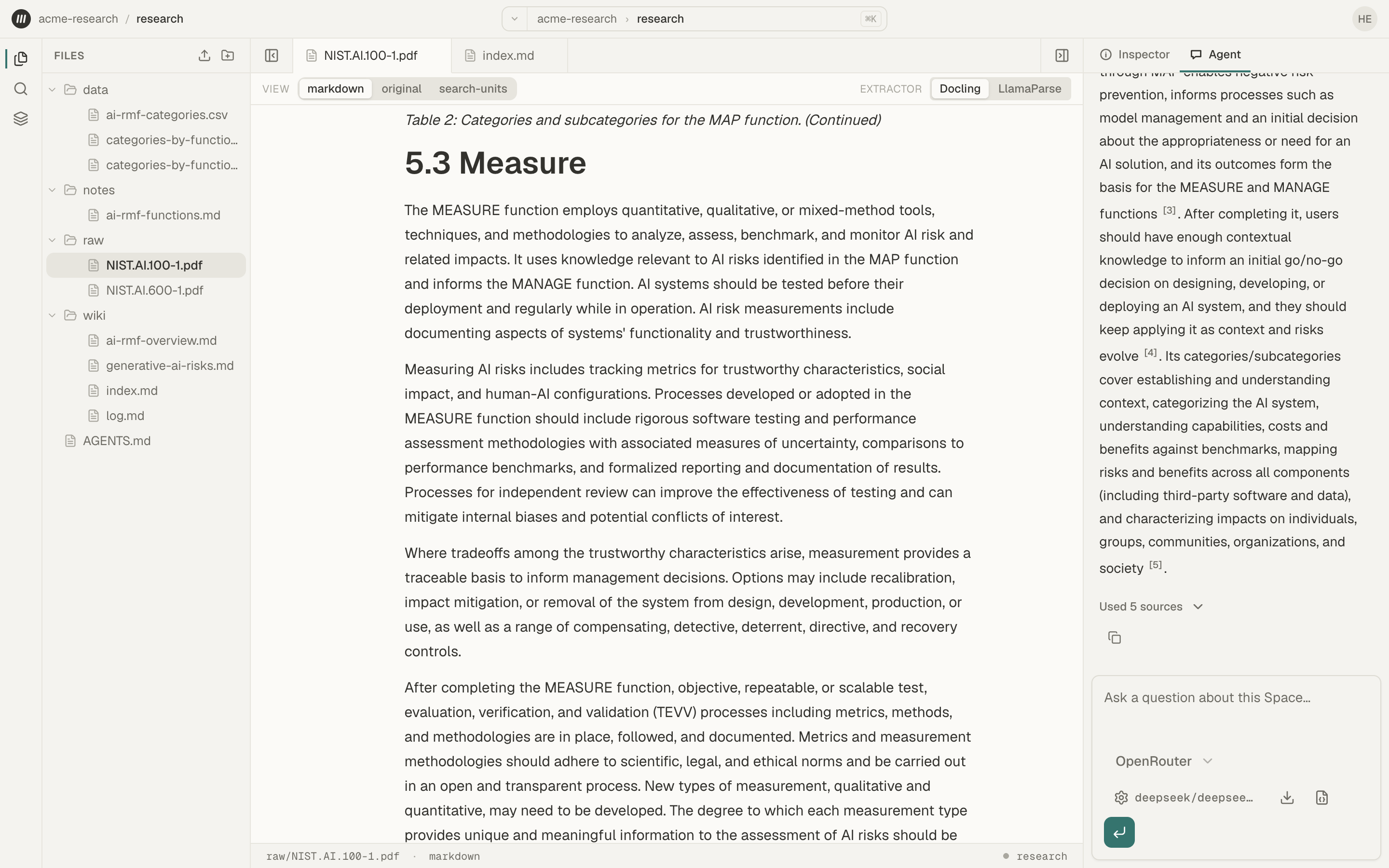
Mempipe is a workspace for the files you learn from. You upload PDFs, Markdown notes, and CSV files to a Space, and Mempipe turns each PDF into Markdown you can read and search. You, the in-app agent, or an AI assistant you connect can then search those files and answer questions with citations that open the source passage. You can save what you learn as Markdown notes and wiki pages in the same Space.
What you can do
Section titled “What you can do”- Keep related files together. A Space holds your files and folders. Upload PDFs, Markdown notes, and CSV files, or drag in a whole folder.
- Read a PDF as Markdown. Mempipe extracts each PDF’s text, headings, and tables into Markdown. From a passage, you can open its page in the original PDF.
- Search inside your files. Find an exact word or phrase, or rank passages by the words you type, across the PDFs and Markdown notes in a Space.
- Ask questions and check the answers. The in-app agent reads your files and answers with numbered citations. Opening a citation shows the passage it came from.
- Save what you learn. Ask the agent to save an answer as a note, or write one yourself. Notes and wiki pages are ordinary Markdown files, so you can read and edit them like any other file.
- Work with tables. Open a CSV file as a table, query it with SQL, and chart the result.
- Use your files from other AI tools. Connect Claude, Claude Code, ChatGPT Desktop, Codex, Cursor, or VS Code. A connected assistant can search and read the Space. It can write files only if you allow that when you connect it.
Build a wiki that grows
Section titled “Build a wiki that grows”Mempipe supports the LLM wiki pattern. Your source files stay unchanged in a raw/ folder. An agent writes linked Markdown pages in a wiki/ folder, with citations back to the sources. A file named AGENTS.md holds the rules it follows. When you add a source, the agent updates the same pages instead of starting over.
To try it, build your first LLM wiki.
What you need
Section titled “What you need”- A Mempipe account. Signing up is free. The Free plan includes two Spaces, 200 MB of storage, 100 files and folders, and files up to 32 MB each. Compare plans.
- A model API key, for the in-app agent only. The agent uses a key you bring from OpenAI, Anthropic, OpenRouter, or Vercel AI Gateway. That provider bills you for what the agent uses. You can upload, read, search, and edit files without a key.
- Your own AI assistant, if you want to connect one. A connected assistant runs on its own model and account.
What Mempipe does not do
Section titled “What Mempipe does not do”- It does not guarantee an answer is right. An AI answer can be wrong, and it can include points with no citation. A citation shows where a claim came from, so you can check it. Read the passage before you rely on the claim.
- It does not search by meaning. Search looks for the words you type. Use the words your document uses.
- It does not bring in files from other apps. There is no connection to Google Drive, email, or Slack. You upload files yourself.
Get started
Section titled “Get started”- Create a Mempipe account.
- Find your way around a Space.
- Ask questions about a PDF and get cited answers.
New to the word Space? Read What is a Space? Mempipe terms explained covers the other words the app uses.