Check an AI-written wiki against its sources
To check an AI-written wiki, open the citation behind each claim you plan to rely on and read the passage it cites. Look for claims with no citation, recheck every number, and ask the agent to report gaps and contradictions. A citation that opens proves the passage exists. It does not prove the sentence says what the passage says, so that judgment is yours.
Checking matters because models make ordinary mistakes. They can leave out a citation, misread a passage, restate a number wrongly, or present a guess as a fact. How often this happens depends on the model you choose.
Check a claim
Section titled “Check a claim”-
Open the page.
In Files, open the wiki page. Its citations appear as highlighted labels in the text.
-
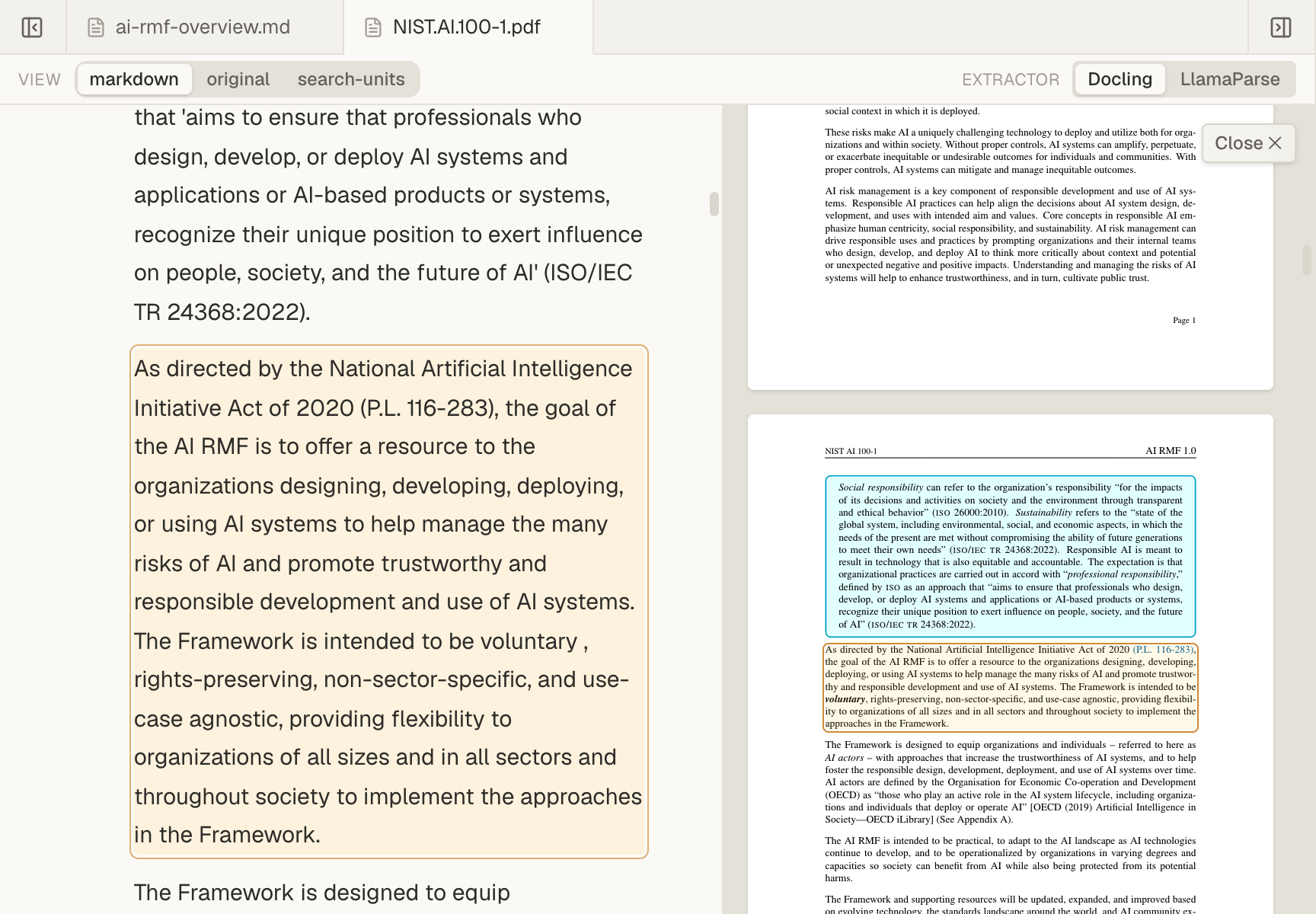
Open the citation beside the claim.
Mempipe opens the source with the cited passage highlighted. For a PDF, check the original page when tables, figures, or layout matter. See Open a citation and check its source.
-
Compare the claim with the passage.
Read the whole passage, not only the highlighted line. Ask yourself:
- Does the passage say what the sentence says?
- Did a careful word such as “may” or “about” become a certainty?
- Is a number, date, or name exactly the same?
- Does the claim join two passages into a conclusion that neither one states?
-
Fix what is wrong.
Edit the sentence yourself, as Write and edit Markdown notes shows, or ask the agent. For example:
In wiki/overview.md, the claim about [topic] does not match itscitation. Read the cited passage again, correct the sentence, andkeep the citation. Append a note to wiki/log.md.
What to look for
Section titled “What to look for”- Claims with no citation. Mempipe does not check that every claim is cited. Ask the agent to add a citation or mark the claim as unverified.
- Numbers. Recompute totals and percentages from the source. Models often restate a figure as a plausible wrong one.
- Hidden conflicts. When two sources disagree, the page should say so and cite both, not quietly pick one.
- Invented dates. Check the dates in
wiki/log.md. A model can make one up. - Pages the index misses. Every page in
wikishould appear inwiki/index.md.
Ask the agent to review the wiki
Section titled “Ask the agent to review the wiki”The in-app agent can do a first pass. Mempipe does not run these checks on its own, so ask for them now and then, for example after adding a source:
Review the wiki against its sources. Read wiki/index.md and every pageit lists. Without changing any file, report:- claims with no citation;- citations whose passage does not support the claim;- numbers that do not match the source;- contradictions between pages or between sources;- pages missing from the index, and links that do not open a page.Read the report, check the items you care about, and then ask the agent to fix the ones you agree with. The agent’s review is a model’s judgment too, so it can miss problems or report ones that are not there.
When a citation does not open its passage
Section titled “When a citation does not open its passage”- The source opens with “This citation does not resolve in the version shown here.” The cited passage is not in the version of the document shown. The source may have changed since the page was written: for example, a new version of the file was uploaded, or it was processed again with a different extractor. Or the citation was wrong from the start. Choose Clear citation to read the document, find the passage, and ask the agent to cite it again.
- The citation is shown in red. No file exists at the cited path. The file may have been renamed or moved, or the agent may have written a wrong path. Find the file, then tell the agent its path and ask it to fix the citation. If you moved the file, you can also move it back.
What a citation does and does not prove
Section titled “What a citation does and does not prove”A citation that opens proves that the passage exists and shows you where it is. It does not prove that:
- the sentence summarizes the passage fairly;
- every claim on the page has a citation;
- the source itself is correct.
Keep the claims you have checked and the ones you have not apart. A short line such as “Not yet checked” beside a claim is enough.
Still stuck? Email hello@mempipe.ai.
Next steps
Section titled “Next steps”- Update your LLM wiki when you add sources.
- Find an exact phrase in your documents to confirm a claim yourself.