What is an LLM wiki?
An LLM wiki is a set of linked Markdown pages that an AI agent writes and keeps up to date from your source documents. Your sources stay as they are. You ask the agent to read them and save what it learns as wiki pages, and to update those pages when you add a source or learn something new. What you learn builds up over time, instead of being worked out again from the raw files for every question.
The pattern comes from Andrej Karpathy’s LLM wiki gist. It works with any agent that can read and write files. In Mempipe, one Space holds your sources and your wiki, and a valid citation in a wiki page opens the passage in the source it came from, even in a PDF.
The three parts of an LLM wiki
Section titled “The three parts of an LLM wiki”| Part | What it holds | Where it lives in a Space |
|---|---|---|
| Sources | The documents you collect, such as papers, reports, contracts, and transcripts. The agent reads them, and your instructions tell it not to change them. | Files in the raw folder |
| Wiki | Markdown pages the agent writes: summaries, topic pages, comparisons, and open questions, linked to each other. | Files in the wiki folder |
| Instructions | The rules you give the agent for adding a source, answering a question, and tidying the wiki. | AGENTS.md, at the top level of the Space |
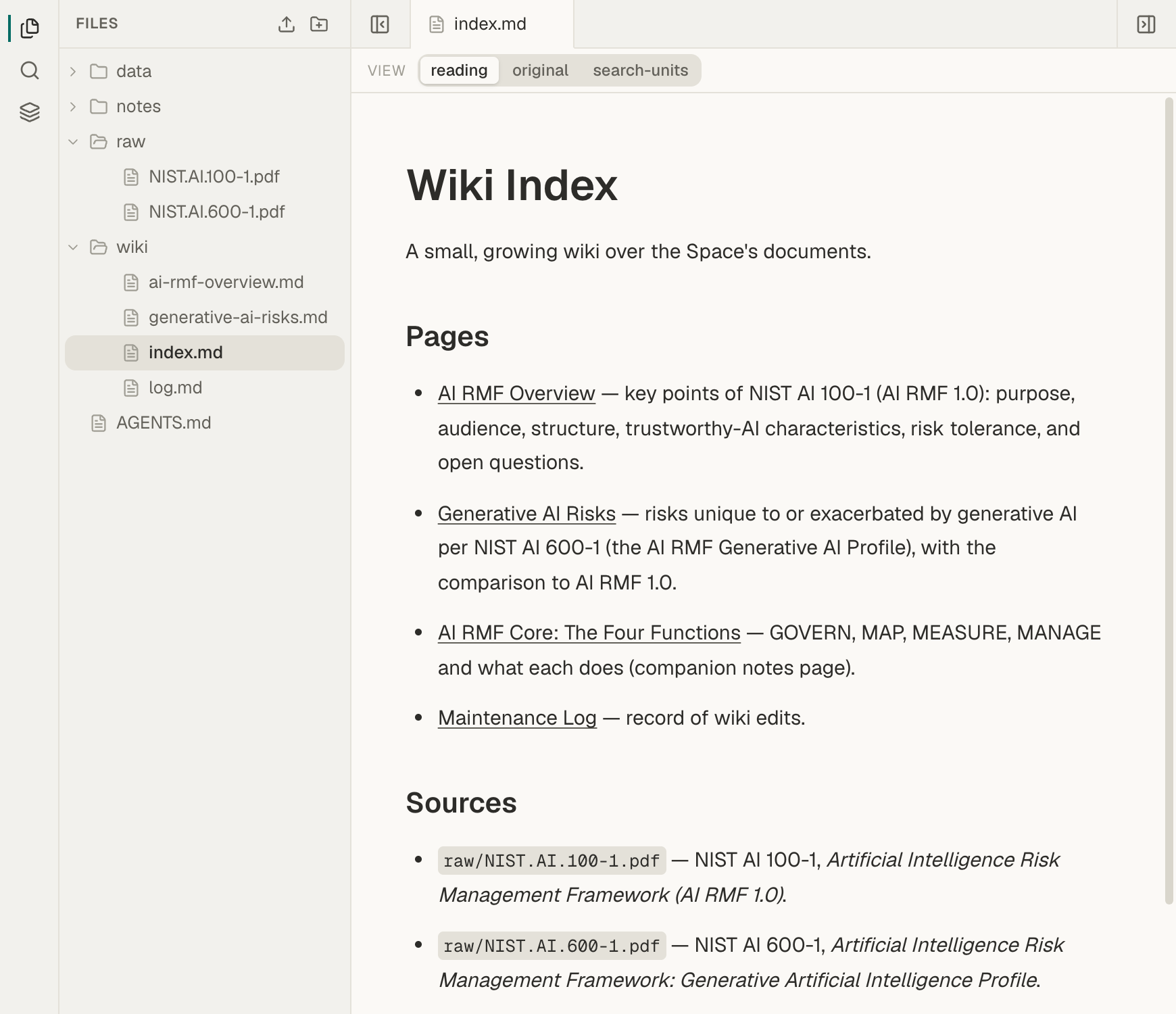
Two wiki pages keep the wiki easy to find your way around:
wiki/index.mdlists the wiki’s pages and the sources they cover.wiki/log.mdgets a short entry when a source is added or the wiki is tidied.
A small wiki looks like this:
AGENTS.mdraw/ annual-report-2025.pdf annual-report-2026.pdfwiki/ index.md log.md overview.mdIn Mempipe, an agent can create and replace Markdown, SQL, and chart files. It cannot change a PDF, rename a file, or delete one. A Markdown source in raw is protected only by the instructions you give the agent, which is why the instructions say to leave raw unchanged.
What you do with an LLM wiki
Section titled “What you do with an LLM wiki”You work with the wiki in three ways:
- Add a source. Upload a document to
raw, then ask the agent to read it, update the pages it affects, add pages for new topics, and record the change in the log. See Update your LLM wiki when you add sources. - Ask a question. The rules in
AGENTS.mdtell the agent to read the wiki first, then go back to the sources for evidence. When an answer is worth keeping, ask the agent to save it back into the wiki. - Check the wiki. Now and then, ask the agent to look for claims without citations, contradictions, and pages the index does not list. Then check the claims you rely on yourself. See Check an AI-written wiki against its sources.
How an LLM wiki differs from chat history and RAG
Section titled “How an LLM wiki differs from chat history and RAG”A chat keeps a transcript. The next conversation starts again from the files, or from whatever the tool chose to remember.
Retrieval-augmented generation (RAG) finds the passages that ground one answer. What happens to that answer afterwards is up to the application.
An LLM wiki keeps the result. The work lives in named pages that you can read, edit, link to, and cite, and the next question starts from what you already worked out.
What Mempipe adds to the pattern
Section titled “What Mempipe adds to the pattern”A folder of Markdown files and a coding agent are enough to start an LLM wiki. Mempipe adds what that setup lacks for sources such as PDFs:
- Citations that open the source. Mempipe turns each PDF into readable text that remembers where every passage sits in the original. A wiki page can cite a passage, and opening the citation shows it highlighted on the PDF page.
- Search across sources and wiki together. Ranked search and exact-phrase search cover the PDFs and Markdown pages in the Space, for you and for your agents.
- One Space for every agent. The in-app agent and your own AI tools, such as Claude, Claude Code, and Codex, work from the same files. Your own tools connect over MCP.
- Edits that are not silently lost. An agent replaces a page only by naming the version it read. If someone changed the page after that, the save is refused, so a newer edit is not overwritten.
- Ordinary files. Every page is plain Markdown that you can read and edit yourself.
What Mempipe does not promise
Section titled “What Mempipe does not promise”- An agent-written wiki can be wrong. Models can leave out citations, misread a passage, or state a guess as a fact. A valid citation lets you check a claim. It does not prove the claim.
- Mempipe does not check the wiki for you. You ask the agent to check it, and you review the result.
- Mempipe does not sync with Obsidian or a folder on your computer. The wiki lives in your Space.
Start your wiki
Section titled “Start your wiki”- Build an LLM wiki from your PDFs with the in-app agent.
- Build an LLM wiki with Claude Code or Codex if you already work in a coding agent.