How to build an LLM wiki from a PDF: the exact prompts
Karpathy's LLM wiki pattern applied to one PDF: the exact prompts, the saved page, the citation that opens the source, and Claude Code plus Obsidian compared.
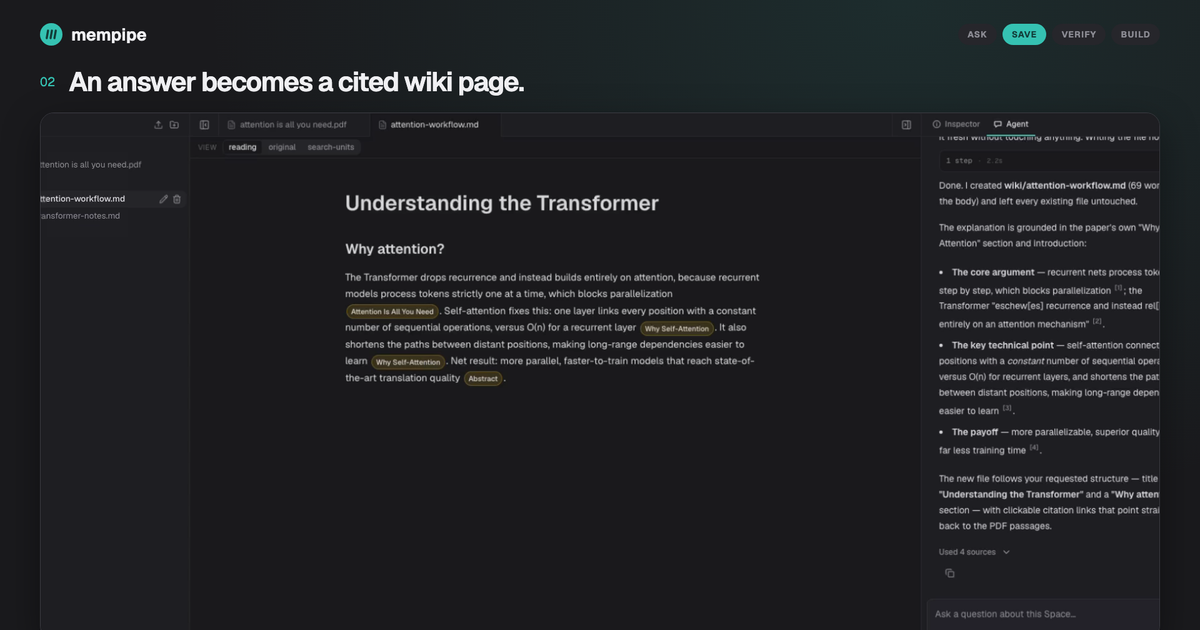
An LLM wiki is a folder of Markdown pages that an agent builds from your sources and keeps up to date. The idea comes from Andrej Karpathy’s gist, and most people who build one start with Claude Code, a local folder, and Obsidian.
This post builds one from a PDF instead, in a hosted Mempipe Space, so that a citation in the wiki opens the passage it came from. It uses the exact prompts from the recording below. You will end with one wiki page about a research paper, two cited sections, and a citation you can click to see the highlighted paragraph in the original PDF.
The 58-second recording this post follows. Recorded in local Mempipe with waiting time shortened; the interactions and the saved page are real.
What an LLM wiki is
Karpathy’s gist describes three layers and three operations.
The layers:
- Raw sources. Articles, papers, transcripts. The agent reads them and never edits them.
- The wiki. Markdown pages the agent writes and maintains: summaries, entity pages, concept pages, syntheses, all cross-linked.
- The schema. A file such as
CLAUDE.mdorAGENTS.mdthat tells the agent how the wiki is organized and what to do during each operation.
The operations:
- Ingest. Add one source. The agent reads it, writes or updates the relevant pages, and records what it did in a log.
- Query. Ask a question. The agent answers from the wiki first, cites its pages, and can file a useful answer back into the wiki.
- Lint. Periodically check the wiki for contradictions, stale claims, orphan pages, and missing links.
The point is that synthesis compounds. Retrieval-augmented generation retrieves passages to ground an answer. What happens to that answer afterwards is the application’s choice, and a chat usually keeps only the transcript. A wiki keeps the synthesis itself, so the next question starts from what you already worked out.
Why PDFs are the hard part
In a local folder, a source is a file and a citation is a path. That works well for Markdown you clipped from the web. It works less well for a 15-page paper or a 170-page tender, where the claim you care about lives on one line of one page, and the model’s citation is whatever page number it happened to write.
Mempipe turns each PDF into source-mapped Markdown: readable text where every block knows its page and position in the original. Search runs over those passages. When the agent cites one, the citation is a link to that passage, and opening it shows the page with the passage highlighted. The wiki page is still an ordinary .md file; only the citations know where they point.
Set up the Space
You need a Mempipe account (Free is enough) and an API key from a model provider, because the in-app agent runs on your own key. Reading, searching, and editing files needs no key.
- Create a practice Space, or use a fresh
wiki/folder in an existing one, so the agent cannot change work you care about. - Create a folder named
rawand upload the paper into it asraw/attention is all you need.pdf. The source is Vaswani et al., Attention Is All You Need. - Wait until the paper’s passages appear in Search. PDF processing takes a few minutes.
- Create an empty folder named
wiki. - Open the Agent panel, choose your provider, and enter your model and key under Model & API key.
The folder names are the pattern’s own: raw/ for the originals, wiki/ for the pages. Microsoft’s llmwiki extension for VS Code uses the same layout, with AGENTS.md as the schema, so a Space and a local wiki look alike.
Ask a question, then save the answer as a wiki page
A bare question produces a chat reply. To get a wiki page, name the source path, name the target path, and say what to leave alone. This is the exact first prompt from the recording:
Why did the Transformer replace recurrence with attention? Read raw/attention is all you need.pdf. Save a short, plain-English explanation with clickable source citations in wiki/attention-workflow.md. Use the title “Understanding the Transformer” and a “Why attention?” section. Keep it under 90 words. Leave existing files unchanged.Keep the Space open while the agent works. It searches the paper, reads the relevant passages, writes the file, and reports what it did.
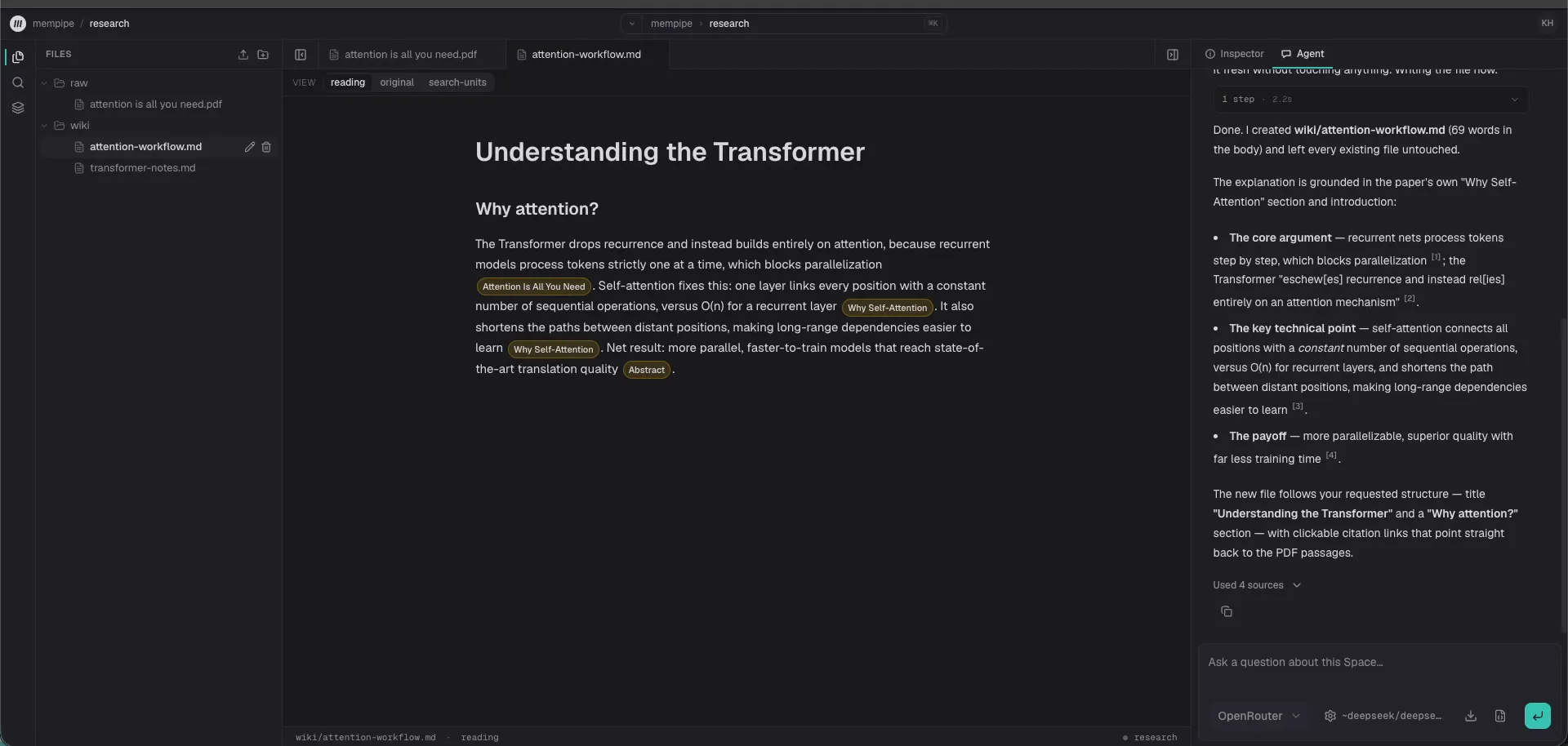
The saved page, opened from the file tree. Each chip is a citation into the paper.
Open wiki/attention-workflow.md in Files. It is a normal Markdown file. The citation chips are Markdown links whose targets point at passages inside the PDF’s derived document.
Open a citation
Click a citation chip. Mempipe opens the paper’s Markdown view at that passage, and the original PDF beside it with the same paragraph highlighted.
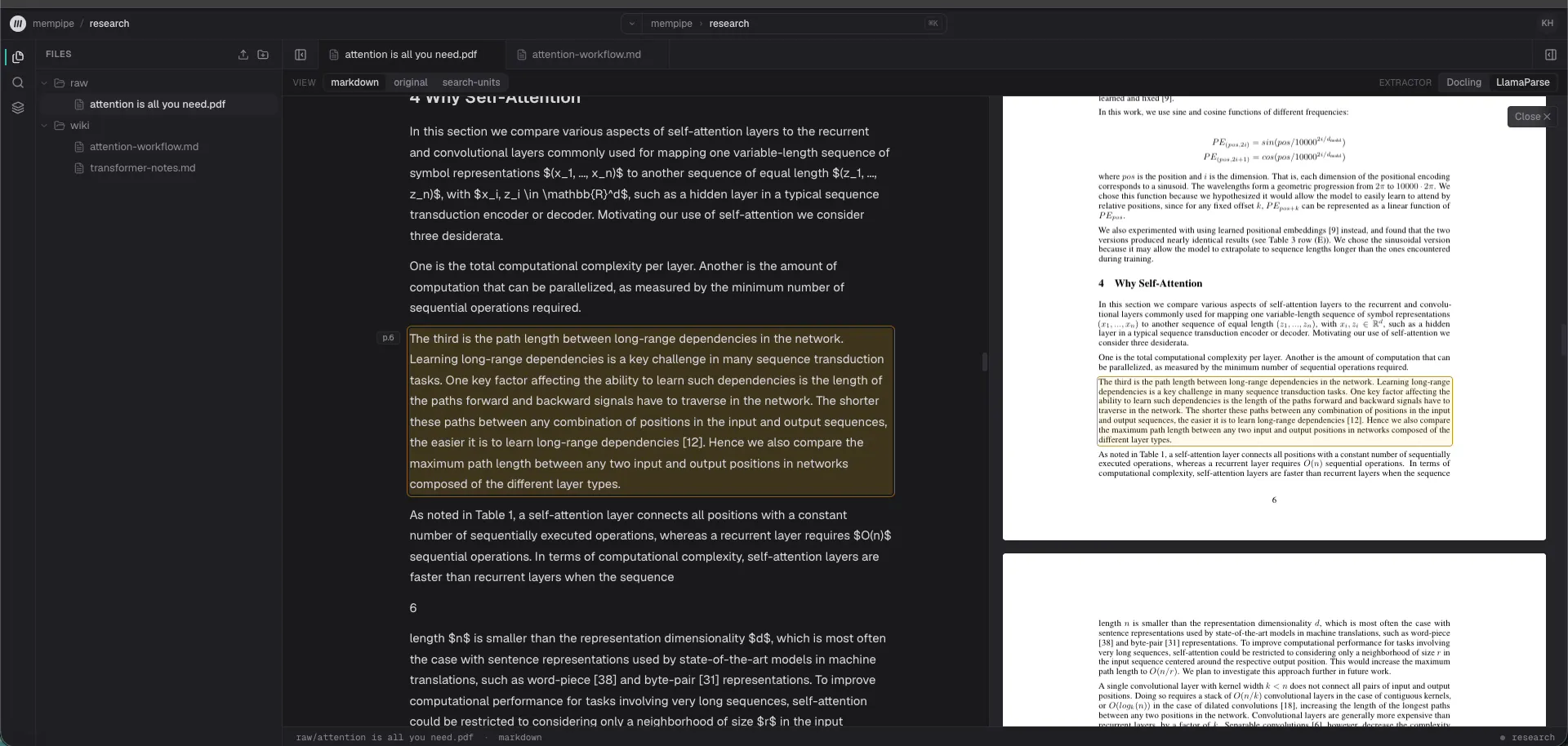
The citation resolves to one paragraph on page 6. The Markdown view and the original PDF show the same passage.
This is the check that a local folder cannot give you. You read the paragraph the model read, in context, and decide for yourself whether the wiki sentence is a fair summary of it.
Extend the same page
The second prompt asks a follow-up and tells the agent to add to the existing page rather than start a new one. Again verbatim from the recording:
How does it know word order? Read the paper’s positional encoding section. Add a short “How does it know word order?” section to the SAME wiki/attention-workflow.md, with clickable source citations. Keep the existing section unchanged. Use at most 45 new words, save the update, and read it back.The agent reads the current page before it writes, replaces the file with a version check so it cannot overwrite an edit it has not seen, then reads the result back.
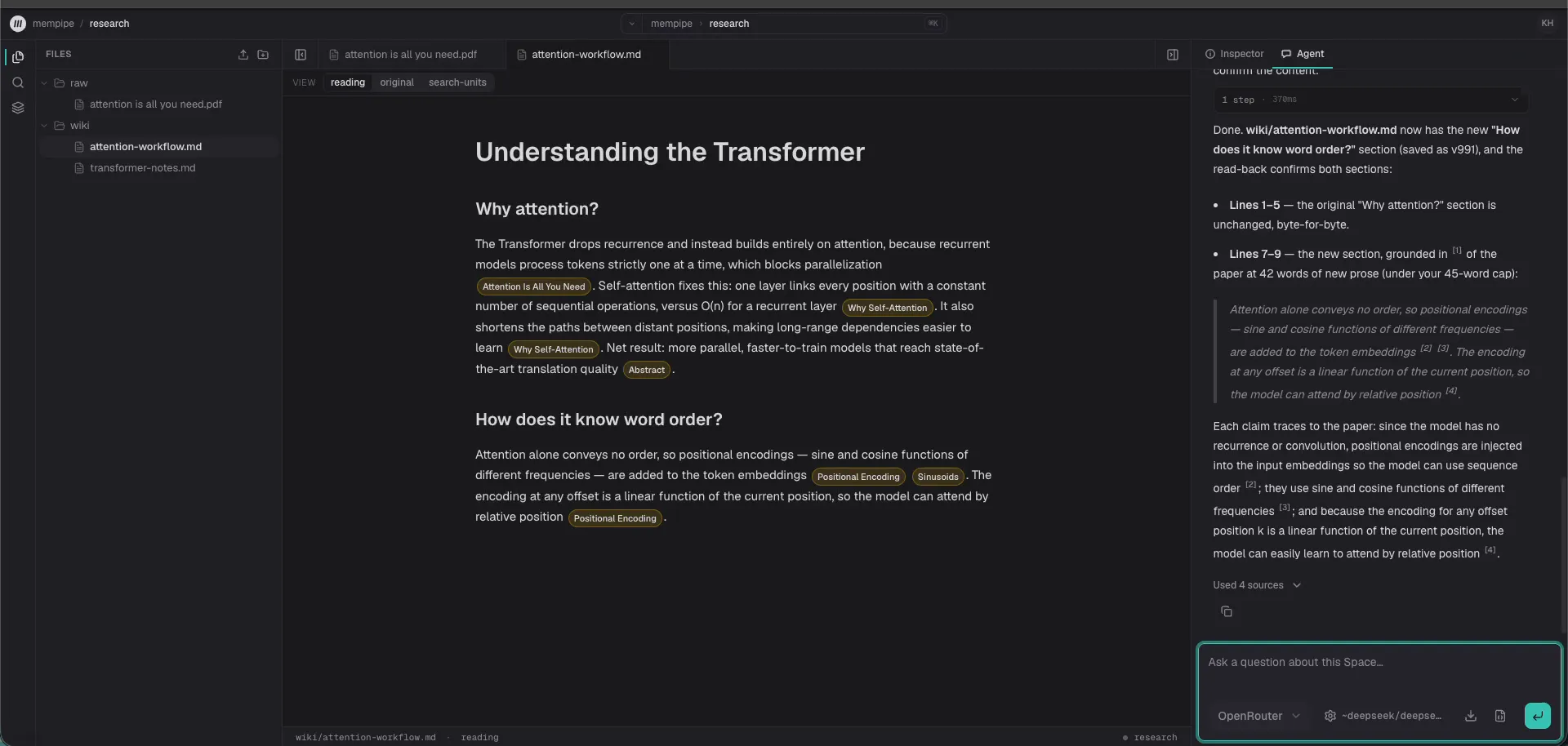
The first section survived unchanged. The new section carries its own citations.
That is the whole loop: ask, save, check, extend. Everything else in the pattern is a way of doing this loop repeatedly without the wiki decaying.
Give the wiki a schema
Karpathy keeps the rules in a schema file so the agent behaves the same way in every session. In Mempipe the file is AGENTS.md at the Space root; the in-app agent reads it fresh on each turn. Ask the agent to create it with rules like these, from the first-wiki guide:
Read wiki/index.md and relevant pages before answering or editing.Keep raw/ unchanged. Maintain knowledge in wiki/ as Markdown.Use source citations returned by your tools. Distinguish facts frominference and keep unresolved conflicts visible.Update the index when needed and append maintenance notes to wiki/log.md.Do not invent dates.Two more files make the wiki navigable as it grows:
wiki/index.mdlists every page and which sources it covers.wiki/log.mdgets one appended entry per ingest or maintenance pass.
The last rule exists because models do invent dates. Tell the agent to use the date you give it, or to leave the date out.
Bring in a second source
Ingest is where a wiki starts to differ from a pile of notes. Upload the next PDF under raw/, wait until it is searchable, then ask the agent to read the current wiki pages first, compare the new source against them, update the pages, and cite both sources wherever they agree or conflict. Ask it to keep disagreements visible instead of silently replacing the earlier finding, and to append a log entry.
We ran this in a controlled session with two long tender documents. The agent updated the same three files it had created from the first PDF, kept 90 of the 91 original non-empty lines of the overview, and produced a page with 127 well-formed citation links across both sources. One clicked citation opened the intended paragraph in the second PDF.
The same run showed what to watch for. The agent invented a log date and had to be told to correct it. It wrote one malformed citation. In a later chat answer it misstated a percentage even though the wiki page held the right figure. None of those were storage or search failures; they were ordinary model mistakes. The wiki made them visible and fixable, which is the most a wiki can promise.
Claude Code plus Obsidian, or a hosted Space?
Karpathy’s own setup is Claude Code in one window and Obsidian in the other. Claude Code writes and maintains the wiki; Obsidian is where a person browses it, follows links, and looks at the graph. Web Clipper turns articles into Markdown sources. It is a good setup, and for a lot of people it is the right one.
Where it is stronger than a hosted Space:
- Everything is local. The folder is yours, it works offline, and git gives you history and sharing for free.
- Obsidian’s graph view, Dataview queries, and plugin ecosystem have no equivalent in Mempipe.
- There is no product between you and the files. You can change any part of the workflow.
Where a Mempipe Space is stronger:
- PDFs become source-mapped documents. A citation opens the passage, with the page highlighted, instead of naming a file.
- Search and grep run over sources and wiki together, in the app and over MCP, so an agent can find a passage by exact phrase or by ranked relevance without reading whole files.
- The Space is hosted. Nothing depends on your laptop being on, and any MCP client can reach the same files.
- Writes are version-checked, so an agent turn that started from a stale page is refused instead of overwriting a newer edit.
What the hosted Space costs you, honestly:
- The in-app agent needs your own provider key, and the provider bills model usage. The Free plan allows 2 Spaces, 100 files and folders, and 200 MB of storage, with a 32 MB limit per file.
- There is no Obsidian sync today. Pages are plain Markdown and copy out through the editor, the API, or an MCP client, but you copy them.
- Lint is a prompt, not a button. You ask the agent to check the wiki; Mempipe does not run checks for you.
- Spaces are private to your organization. Sharing a Space with someone else, or publishing one, is not available yet.
You do not have to choose. Each Space has an MCP endpoint, and one command registers it in Claude Code as a remote server:
claude mcp add --transport http <name> <your Space's MCP URL>After signing in inside Claude Code, it can search, grep, and read the Space, and create or replace wiki pages if you approved write access at sign-in. Claude, Cursor, Codex, ChatGPT desktop, and VS Code use the same per-Space endpoint and Mempipe sign-in, with client-specific setup steps on that Space’s MCP Endpoint page. The MCP guide walks through connecting one and testing it.
What to check before you trust a page
A wiki is only as good as its last review. Before you rely on a page:
- Open the citations that support any claim you will act on. A citation that resolves proves the passage exists, not that the sentence summarizes it fairly.
- Look for claims with no citation. The agent can leave them out; Mempipe does not check coverage for you yet.
- Read
wiki/log.md. If an ingest is missing from the log, the page may be older than you think. - Recompute any number. Models paraphrase figures into plausible wrong ones.
Mempipe makes each of those checks a click. It does not make them unnecessary.
Next steps
- Follow the first-wiki guide with your own document.
- Read what the LLM wiki workflow looks like in Mempipe, and what it does not claim.
- Coming from NotebookLM or Gemini Notebook? The comparison shows where the two workflows differ.
- Try Mempipe, now in public beta. Start on Free.