See what changed between two PDFs
Compare contracts, specifications, and reports with both originals side by side. Follow edits, additions, removals, and moved passages from the change list to the pages where they appear.
Read the change in context
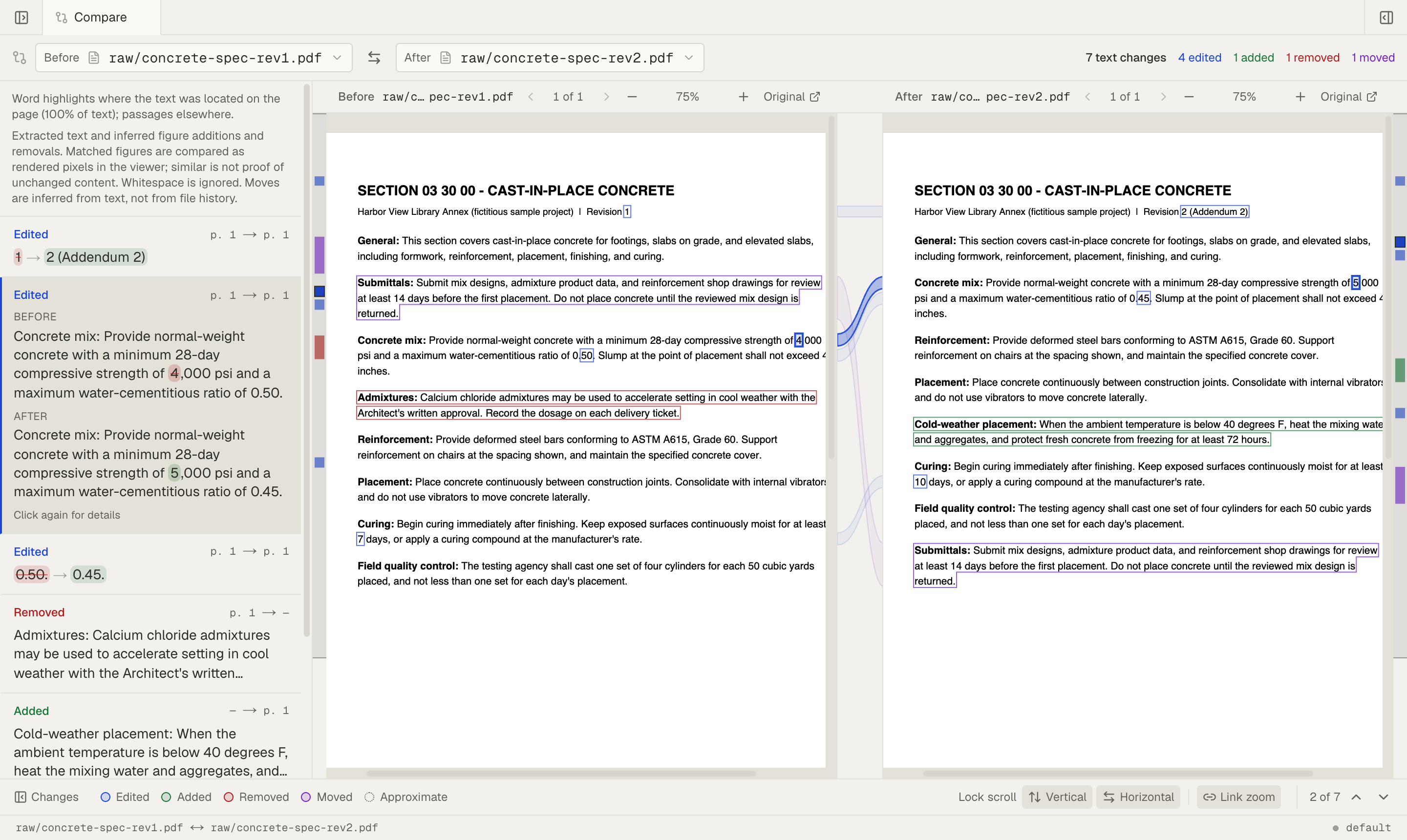
Select a change to read the old and new wording and bring the relevant passages into view. Highlights point to the changed text on the original pages, so you can check a revised number, an added clause, or a removed paragraph in context.
Built for careful review
- Changes by type. Labels distinguish edits, additions, removals, and inferred moves. Step through the list or jump to the change you want to review.
- Both originals in view. Link scrolling and zoom to keep corresponding passages together. Unlock them to inspect one side on its own.
- Clear direction. Choose which file is Before and which is After, or swap them in one click.
- Word and passage highlights. Highlights mark located words or the surrounding passage. A dotted outline marks an approximate location.
Learn how
Compare two PDFs →
Open a PDF, choose Compare, and pick a second PDF in the same Space to review changes beside both original pages.
Read a PDF as Markdown and check the original page →
Open the PDF, choose markdown in the View switcher to read its text, and choose a section's page chip to see that passage on the original page.
Upload files to a Space →
Open Files in your Space and choose Upload file, or drag files and whole folders from your computer into the file list.
Frequently asked questions
- How do I compare two versions of a PDF?
- Upload both as separate PDFs in the same Space and wait for processing. Open the earlier file, choose Compare, and select the revision under After. Comparison uses two files; it cannot retrieve an earlier version of a file you replaced.
- What can the comparison miss?
- Comparison uses extracted text, so it can miss changes when extraction skips or misreads content. It ignores whitespace and infers moves. Check important passages on both original pages, especially in scans, tables, or drawings.
- What does a dotted outline mean?
- The passage location is approximate because word positions are unavailable. Read the old and new wording in the change list, then check the surrounding passage on the original page.
- Does it compare drawings or images?
- You can inspect matched figures side by side, and Mempipe infers figure additions and removals. It does not compare every mark on a drawing or perform a full-page visual comparison.
Explore more
Build knowledge that comes with receipts.
Bring your sources. Find the evidence. Leave behind something worth keeping.
Public beta. Start on Free and upgrade to Starter for more capacity. Bring your own API key for the in-app agent. Reading, searching, and editing files needs no key.