mempipe

Comparison guide

A NotebookLM (now Gemini Notebook) alternative for cited Markdown you own

Mempipe is an alternative to NotebookLM for people who want the result of their research to be files: a Markdown wiki the agent maintains, with citations that open the PDF page, in a Space that your own agents can read over MCP. Choose NotebookLM to explore a source set inside Google's app. Choose Mempipe when the pages need to outlive the chat.

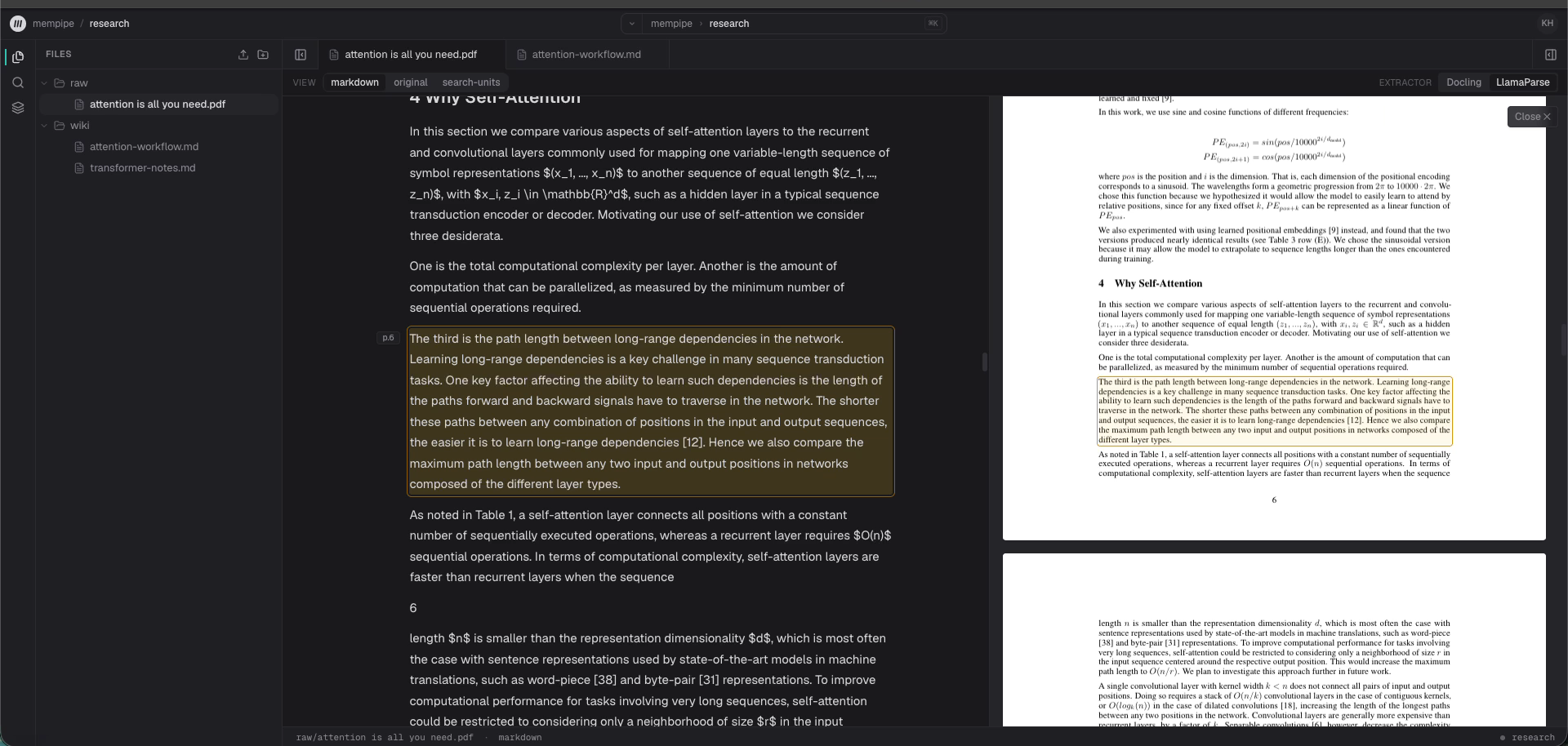
A citation opened in Mempipe. The paper's extracted Markdown shows the cited paragraph highlighted and marked p.6, and page 6 of the original PDF sits beside it with the same paragraph highlighted. The file tree shows a raw folder holding the PDF and a wiki folder holding two Markdown pages.
The difference in one frame: a citation in a wiki page opens the exact paragraph, in the extracted text and in the original PDF. A capture of the running app, from the session in the 58-second demo.View full size

Side by side

NotebookLM facts come from Google's help center and the rename announcement, read on 20 September 2026. Mempipe facts describe the public beta and were last checked on 30 September 2026.

Compare
Sources

NotebookLM / Gemini Notebook

Up to 50 sources per notebook without a paid plan, more with a Google AI plan. Each source can be up to 500,000 words or 200 MB. PDFs, Google Docs and Slides, web pages, YouTube videos, audio, images, Markdown, and text.

Mempipe

A Space is a folder tree. Free allows 2 Spaces, 100 files and folders, and 200 MB, with 32 MB per file. Starter allows 10 Spaces, 500 files and folders, and 1 GB, with 64 MB per file. PDF and Markdown become searchable, citable documents; CSV becomes queryable tables. No audio or video.

Where your work ends up

NotebookLM / Gemini Notebook

Chat answers and saved notes stay inside the notebook, up to 1,000 notes each. Notes export to Google Docs or Sheets.

Mempipe

Markdown files in the Space. The agent writes wiki pages beside the sources, and you read and edit them like any other file. Nothing needs exporting.

Citations

NotebookLM / Gemini Notebook

Inline citations to the source text; a short source is cited as a whole. You check them inside the notebook.

Mempipe

A citation is a link to a source-mapped passage. Opening one shows the passage in context; for a PDF, that is the page with the passage highlighted. The link works from a wiki page, a search result, or an agent's answer.

Finding a passage

NotebookLM / Gemini Notebook

Ask the notebook a question.

Mempipe

Ask the in-app agent, run a ranked search, or grep for an exact string, then open the hit. The same search and grep are available to your own agents over MCP.

Your own agents

NotebookLM / Gemini Notebook

Used through its own chat and the Gemini app. Google documents an API for the Enterprise edition.

Mempipe

Each Space is an MCP endpoint. Claude Code, Claude, Cursor, Codex, ChatGPT desktop, and VS Code can search, grep, and read it, and write Markdown pages when you approve write access at sign-in.

Models

NotebookLM / Gemini Notebook

Google's Gemini models, included in the plan.

Mempipe

Bring your own API key for the in-app agent; your provider bills model usage. Reading, searching, and editing files needs no key.

Sharing

NotebookLM / Gemini Notebook

Share a notebook privately or with a public link. Viewers can ask it questions.

Mempipe

Spaces are private to your organization today. Sharing a Space with someone else, or publishing one, is not available yet.

Beyond text

NotebookLM / Gemini Notebook

Audio and video overviews, slides, flashcards, quizzes, mind maps, and reports generated from your sources.

Mempipe

None of those. Mempipe covers the part where research becomes pages you keep: a cited Markdown wiki over your sources, plus SQL over CSV data.

Price

NotebookLM / Gemini Notebook

Free with standard limits; higher limits with Google AI Plus, Pro, and Ultra.

Mempipe

Free, or Starter at $9.99 per month billed yearly, or $12 billed monthly.

Choose NotebookLM or Gemini Notebook to explore a source set

If the job is to understand a bounded set of sources, ask questions, and generate a study aid or an audio overview, Gemini Notebook is a very good fit and the model is included.

Choose Mempipe when the pages must outlive the chat

If the job ends in a wiki, a brief, or a table that someone will reopen, edit, and audit next month, Mempipe keeps it as Markdown with the source trail attached. Build an LLM wiki from your PDFs shows the setup.

Choose Mempipe when your agents need the same files

Claude Code, Cursor, Codex, and other MCP clients search, read, and, with your approval, write the same Space the in-app agent uses. There is no separate export step.

Frequently asked questions

Is NotebookLM the same as Gemini Notebook?
Yes. Google renamed NotebookLM to Gemini Notebook on 16 July 2026 and described it as the same standalone product. This page uses both names: most people still search for and say NotebookLM, and the product now answers to Gemini Notebook. Everything on this page applies to both.
Is Mempipe a full replacement for NotebookLM or Gemini Notebook?
No. Gemini Notebook, as NotebookLM is now called, generates audio and video overviews, slides, flashcards, quizzes, and mind maps from your sources; Mempipe does none of that. Mempipe replaces the part where research turns into pages you keep: a Markdown wiki with citations that open the source, in files your own agents can read over MCP.
Can I bring my NotebookLM or Gemini Notebook notes into Mempipe?
Export the notes from Gemini Notebook to Google Docs, download the document as Markdown (.md), and upload the file to a Space. Uploaded Markdown becomes searchable and citable like any other source. A plain text (.txt) file opens as text but isn't searched. There is no direct import.
Do citations really open the page in a PDF?
Yes. Mempipe turns each PDF into source-mapped Markdown, so a citation points at a specific passage. Opening it shows that passage in the Markdown view and the same paragraph highlighted on its page in the original PDF. That proves the passage exists; whether a sentence summarizes it fairly is still for you to judge.
Do I need my own API key?
Only for the in-app agent, which runs on a key from a provider you choose, and that provider bills model usage. Uploading, reading, searching, and editing files works without a key.
Can my own agent update the wiki?
Yes, with your approval. When you connect a client such as Claude Code, Cursor, or Codex, write access is a separate, unchecked option at sign-in. With it approved, the agent can create or replace Markdown pages using version checks; without it, the connection is read-only.
Are the wiki pages portable?
They are ordinary Markdown files with wiki-style links. Copy them out of Mempipe's editor or through an MCP client, then open them in Obsidian or any other Markdown editor. Mempipe does not sync a local folder today.
Not affiliated with Google, NotebookLM, or Gemini Notebook

This page is a product comparison for people evaluating source-grounded research tools. NotebookLM, now Gemini Notebook, is a Google product. Mempipe is an independent product built around file-native, source-mapped Spaces. If a NotebookLM fact above is out of date, the linked Google pages win.

Keep the research as files you own.

Upload a PDF, ask a question, save the answer as a cited wiki page, and open the citation.

Public beta. Start on Free and upgrade to Starter for more capacity. Bring your own API key for the in-app agent. Reading, searching, and editing files needs no key.