A revised PDF needs a revised wiki
A valid citation can still support an outdated answer. Keep source revisions together and update the wiki pages that depend on them.
The new specification says 5,000 psi. Your wiki still says 4,000 psi, with a citation that opens perfectly.
The citation is valid. The answer is out of date.
This becomes easy to miss as a research collection grows. The new file is available, but last week’s explanation still points to the older source. Someone has to work out what changed, which wiki pages depend on it, and whether the new document supersedes the old one.
A repeatable routine helps: keep both sources, review the change, update the affected page, and reopen the citations.
Keep two recognizable sources
Take two fictional, one-page concrete specifications. Revision 2 raises the strength requirement from 4,000 to 5,000 psi and changes curing from 7 to 10 days. It also adds, removes, and moves passages. You can download both files and follow along.
Give them distinct names in the same collection:
raw/project-a/concrete-spec-rev1.pdfraw/project-a/concrete-spec-rev2.pdfwiki/concrete-requirements.mdDistinct names make it clear which revision supports a claim. Keep the older file so you can explain the change and cite both versions. Mempipe compares two separate PDFs; replacing a file does not give you a version-history picker.
Name and organize sources before building links to them. If you move them later, update the paths in your notes too.
Inspect what changed before asking what it means
Open Revision 1 in Mempipe, choose Compare…, and select Revision 2 as After. Choose a finding to bring the relevant passages into view on both original PDFs.
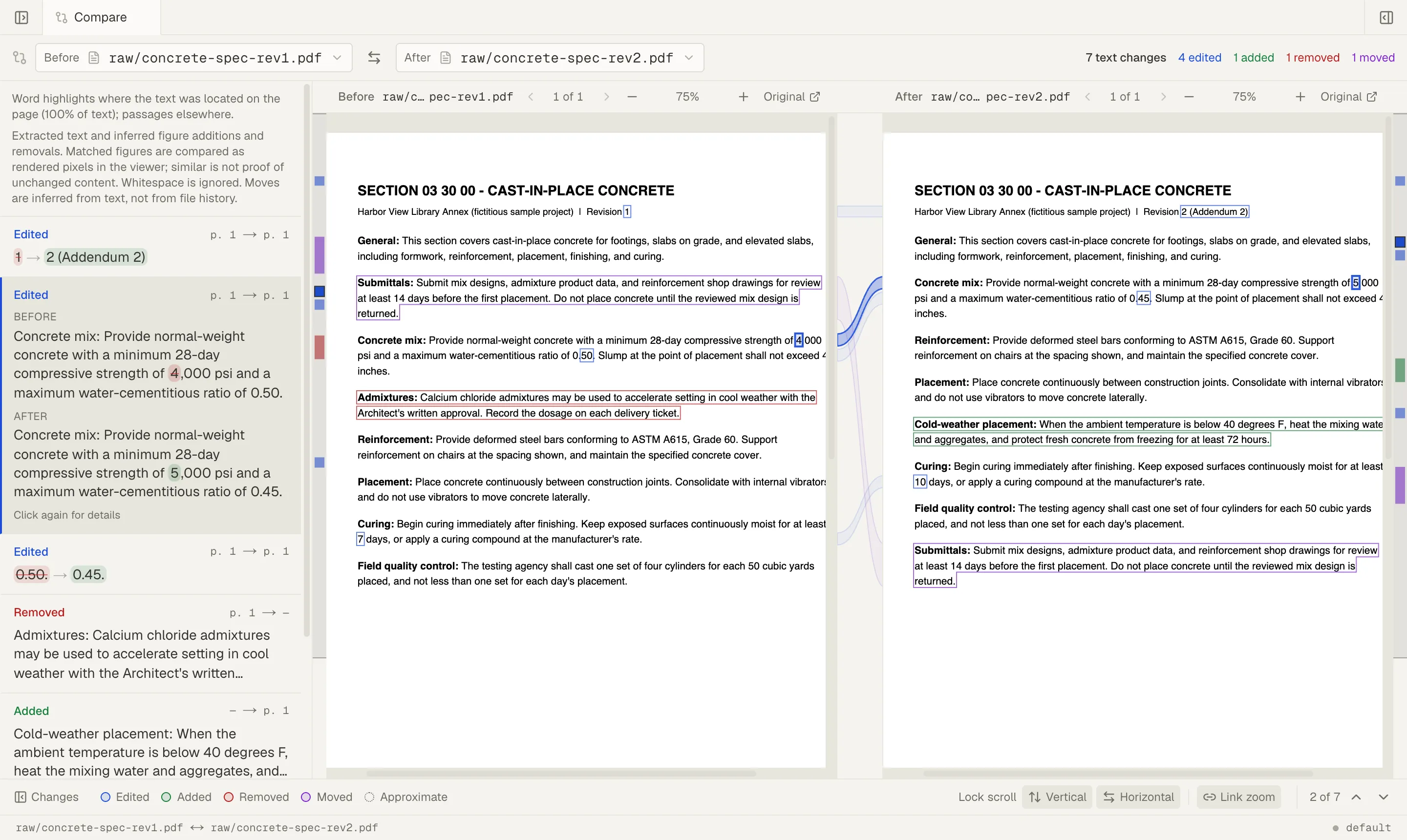
Different changes call for different questions:
- A changed number needs its unit and surrounding conditions checked.
- A new paragraph may introduce a requirement the wiki has never discussed.
- A missing paragraph needs investigation before you conclude the requirement was withdrawn.
- A moved paragraph may need no rewrite at all.
Use the change list to find passages worth reviewing, then read them on the original pages. Extraction can miss or misread content, moves are inferred, and dotted highlights mark approximate locations.
See Compare two PDFs for the controls and help interpreting highlights and coverage.
Update the page that carries the claim
Once you have confirmed the strength and curing changes, ask the agent to read the existing wiki page and both sources. Name the changes, ask it to preserve unrelated sections, and request a citation to each revision.
The revised page should make the difference explicit: Revision 1 required 4,000 psi; Revision 2 requires 5,000 psi. If the sources do not establish which revision governs, say so. A later issue date alone may not answer that question.
Open the saved page and follow both citations. Verify the numbers and units, then make sure unrelated sections survived the update. Make any corrections in Live Preview and save. Add a short note to the maintenance log explaining what changed and why; the log records the work but cannot restore an earlier file.
Organize sources and revisions for your wiki includes the folder layout and a prompt you can adapt.
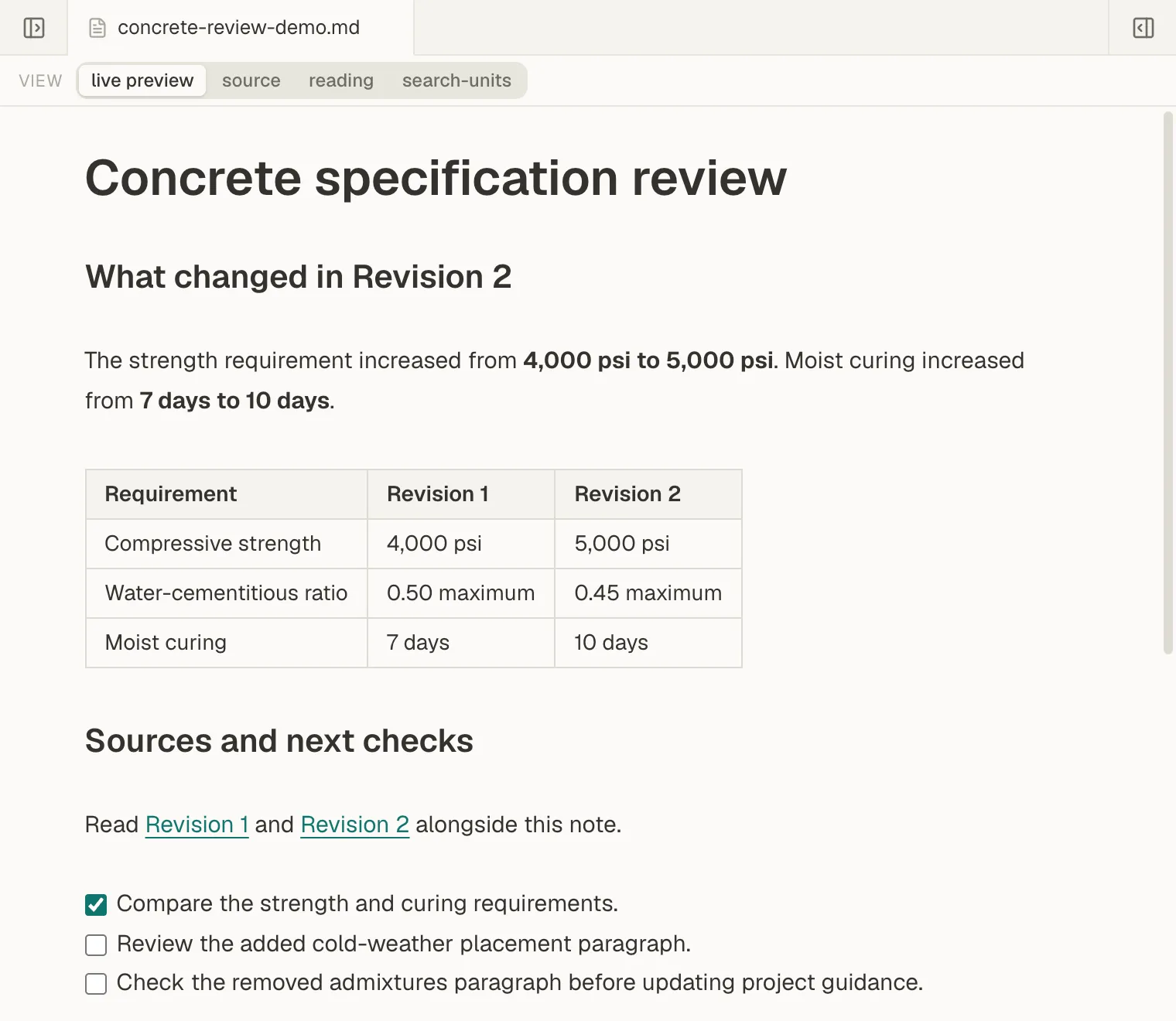
A working review note keeps the old and new values together, with source links and the remaining checks. It gives the wiki update a concrete starting point.
Give the next conversation a better starting point
Next time, ask the agent to read the wiki first and consult the sources to verify details. Or open the same page in Mempipe Notebook inside ChatGPT and select it as the conversation’s starting point.
The page is ordinary Markdown that you can read, edit, and reuse outside the conversation that produced it. It now carries the new requirement, the earlier value, and the evidence behind the change.
Start with one revised document and the wiki page that depends on it. That small update gives the next person, or the next agent, an explanation they can use and sources they can check.