Knowledge agents need a diff tool
A sneak peek at the PDF comparison prototype we’re building for Mempipe.
You upload contract.v1.pdf and contract.v2.pdf and ask AI: “What changed?”
It finds a revised payment term and a removed clause. This is exactly the help you wanted. But as the contracts get longer, you start wondering:
Did it catch everything?
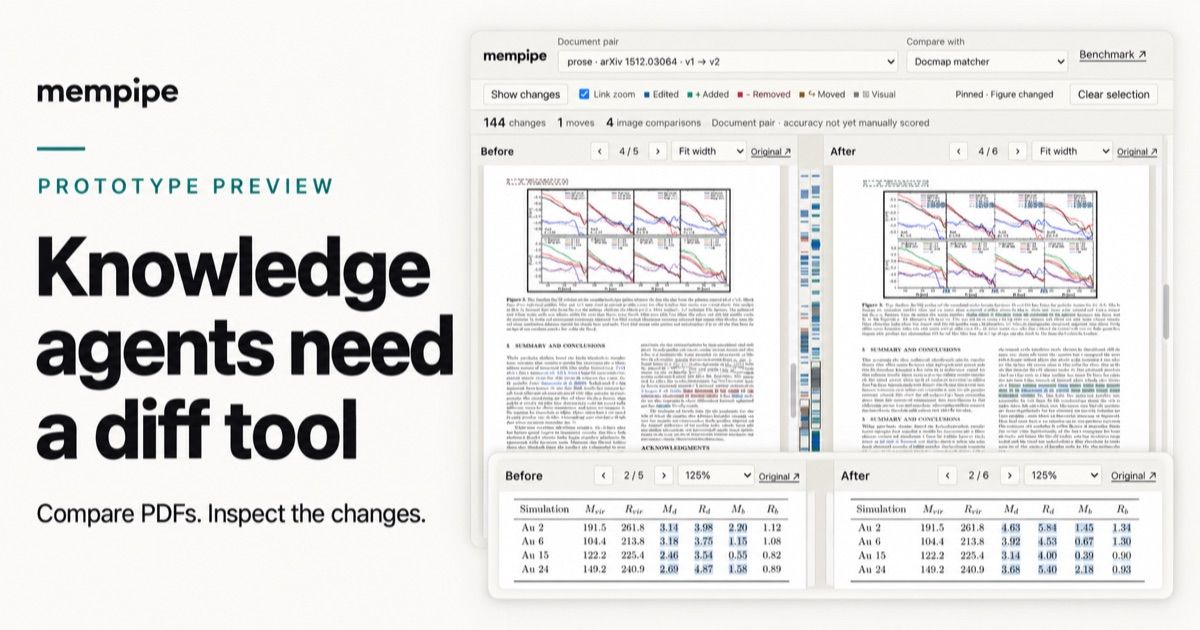
We’re building a document differ for Mempipe so people and agents can inspect a comparison before interpreting the changes. It isn’t integrated into Mempipe yet. Here’s a preview of what our PDF comparison prototype can already do.
Start with the PDF changes. Here are two versions of page 4 from a research paper. You can review text edits alongside the revised plot, with both source pages in view.
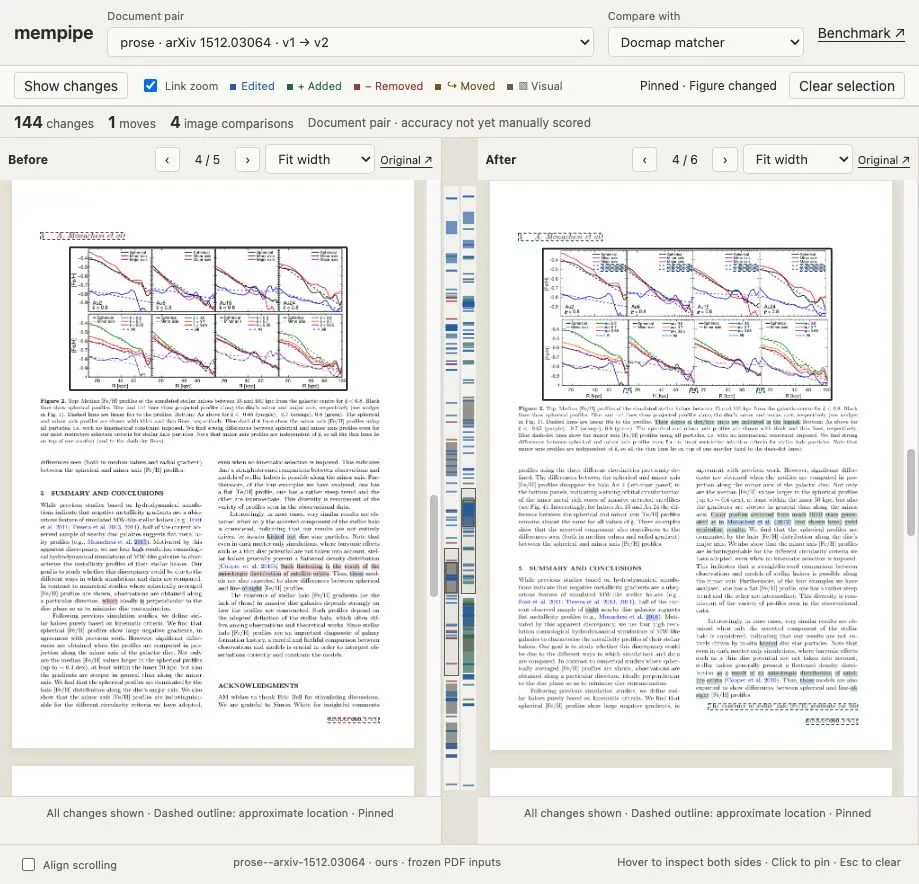
The figure at the top of each page has changed. Selecting it in the prototype opens the image comparison below.
Then look inside the figure. Opening that same plot brings up the image-comparison dialog. Its Changes view highlights visual differences between the versions, including revised curves and new slope labels in the legends.
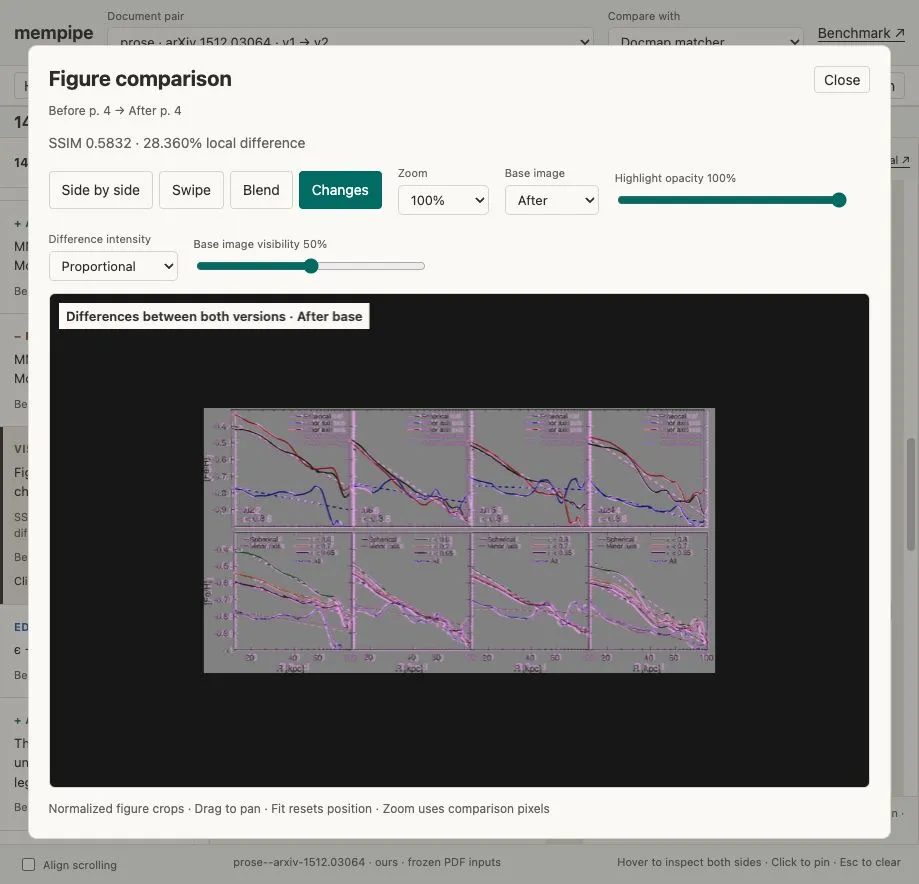
Pink marks detected differences between the normalized figure images, with the revised plot visible underneath for context.
Find changed values inside a table. In this research paper, the Au 2 row’s stellar-mass value changes from 3.14 to 4.63. The viewer highlights the corresponding numbers in both versions, alongside other revised values.

Table 1, page 2 of both PDFs. The table also shifts from the left column to the right.
Catch an edit inside a moved paragraph. This passage moves from page 1 to page 2, and “beginning” becomes “end.” The matcher identifies both the relocation and the wording change; the evidence dialog lets you inspect the edit in context.
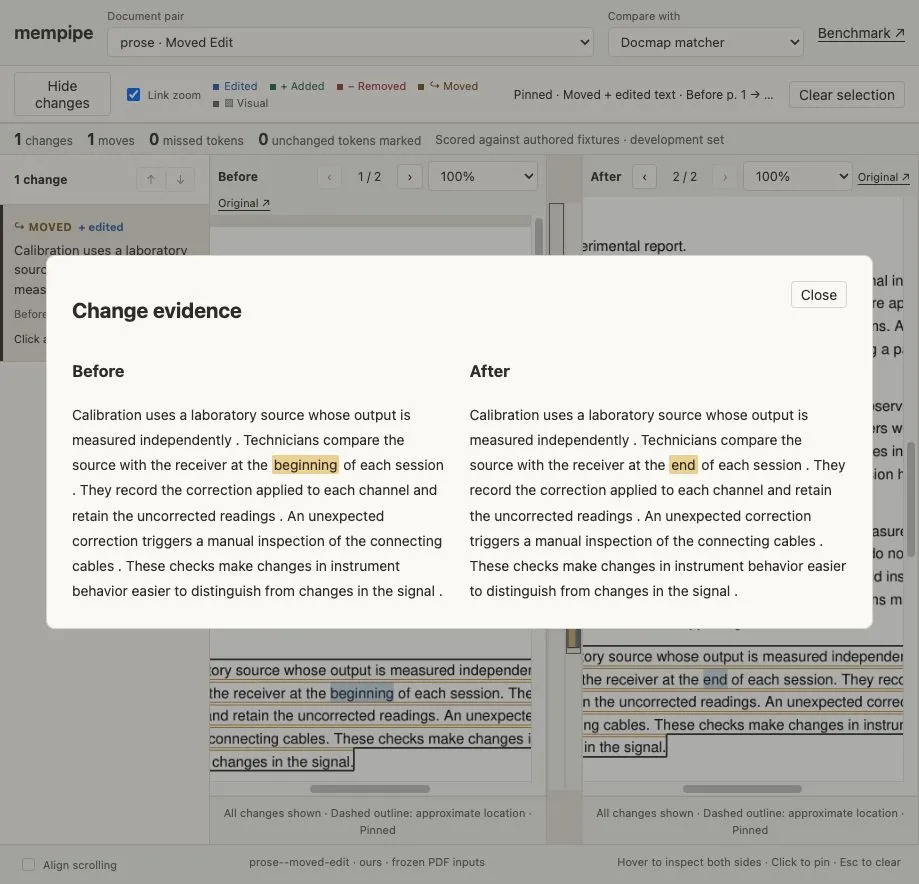
An authored test case. The paragraph stays connected across pages, with its changed word highlighted.
Follow content across pages. In this research paper, an equation shifts from page 4 to page 5. The matcher preserves its unchanged expression and identifies the added equation number (21).
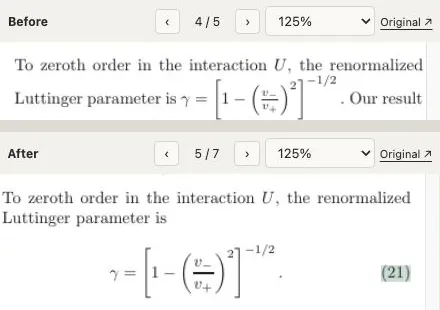
Close-ups from old page 4 (top) and new page 5 (bottom). The inline expression becomes a displayed equation with the added label (21).
Why a useful answer still leaves a coverage question
People are already using workspaces like NotebookLM and Mempipe to ask AI questions across their documents, find supporting evidence, turn research into notes, and compare versions. It can save hours of work. But one question is still hard to answer: did the agent miss anything?
In an April 2025 Reddit discussion, a user said NotebookLM saved their team substantial work comparing a revised 400-page manual. A commenter captured the remaining concern:
“The one qualm I have is the possibility that it overlooked something.”
AI can answer specific questions about a document. The harder problem is coverage: making sure it has caught all the changes, especially as documents get longer and more complex. A useful answer doesn’t tell you what it missed.
That uncertainty matters when a supplier sends a revised quotation, a contract comes back from the other side, or an updated tender arrives. Often, you only get a PDF, without the editable original or tracked changes.
Did the price change? Does the quote still include installation? Was a clause removed, or did it move? You may not know which question to ask until you’ve seen the change.
If we have to reread both documents line by line to trust the AI’s comparison, we’re back where we started.
The tool coding agents already have
Coding agents already have a dependable tool for this: git diff.
For plain text, finding textual changes is largely a solved problem. The file contains the same characters and lines you see in the editor. A diff can show exactly what was added or removed, without asking a model to discover every change by reading both versions.
The agent can then read the surrounding code, search related files, and run tests. It still has to decide what the changes mean and whether they are correct, but it has a concrete comparison to start from.
When the representation gets in the way
Even with text files, comparison gets harder when the text represents something more structured. Reformat an XML file or reorder the keys in a JSON object, and a line diff can show many changes even though the underlying data is the same. Anyone who has dealt with merge conflicts in an Xcode project file knows how noisy structured-file changes can become.
The diff is still correctly reporting changes to the text. But the question we care about is now different: what changed in the content or structure that text represents?
PDFs take that problem further. What we see as a paragraph, table, or diagram is not necessarily stored as one coherent object that a diff can compare.
Add a few words to a paragraph and its lines can wrap differently. The next paragraph may move onto another page. Insert a section and much of the remaining document can shift.
The old page 10 may correspond to parts of new pages 11 and 12. A page-by-page visual comparison can light up substantial differences even where the wording is unchanged.
Extracting text and running a line diff has its own problems. The parser might split the same paragraph differently between versions. A table might arrive as disconnected cells. Reading order may change. Scanned material may need OCR.
And some changes are visual: a bar in a chart, a label in a diagram, or a small mark that is absent from the extracted text.
Knowledge agents need a comparable tool across PDFs, scans, spreadsheets, and presentations. That takes more than extracting searchable text: the comparison has to connect corresponding content and let us verify changes against the original source.
Building the knowledge harness
Much of the work on knowledge workspaces focuses on semantic search: finding relevant information even when the question uses different words. But search is only one part of a knowledge harness: the tools an agent uses to find, read, compare, and verify information.
In Mempipe, we’ve built grep for exact-text search, glob patterns and path filters, and a file system that agents can navigate. An agent can look for a specific clause, find files matching contracts/**/*.pdf, or limit a search to one client’s folder. These tools give it more control over what it searches and how it checks the results.
We believe document diff belongs in that knowledge harness too. Finding information is one job; knowing what changed is another. With plain-text comparison already well established, we started our prototype with PDFs, one of the harder cases, to see how far we could push document comparison. The results so far are promising, with limitations we’re still working through.
Building the missing tool
Our pipeline is:
PDF → parser → shared document representation → comparison → source-linked changes.
Mempipe supports Docling and LlamaParse extraction. Our current full comparison benchmark uses Docling. Keeping extraction separate gives us a path to adopt better parsers and validate other document types without rebuilding the comparison core.
We’re watching work like ParseBench, which evaluates parsing capabilities including content faithfulness, structure, and source grounding. Better evidence at that layer can help comparison downstream, although each parser change still needs testing.
Our matcher tries aggressively to recover correspondence when passages move or their extracted boundaries differ. A corrective pass then challenges weak connections beyond the last substantial exact match, separating unsupported relationships into deletions and additions.
That balance matters. Matching too little turns unchanged passages into false edits. Matching too eagerly can connect unrelated material because it happens to share common words or numbers.
The prototype also localizes changes against the source PDFs and compares figure images. Some locations remain approximate, and small visual changes can still be missed. It cannot restore content a parser omitted.
Evidence before confidence
We’ve exercised 69 document pairs, including research papers and long tenders, and repeatedly reviewed the changes against the original PDFs.
On 14 authored text and region controls, our matcher found all 247 expected changed tokens with zero false positives, without using an LLM. Those controls informed development; they are not a held-out measure of general document accuracy.
There are still difficult matches and presentation problems to resolve.
What we have today is a comparison prototype with structured reports and a human review viewer. The next step is bringing it into the Mempipe workflow.
A diff people and agents can use
For someone already working in Mempipe, the intended workflow is to bring in the revised document and inspect its changes alongside their existing sources and notes.
An agent could ask for the comparison, retrieve changes relevant to a question, and read the before-and-after passages with context. You could follow the same evidence back to the PDFs.
That would support questions like “What changed in the payment terms?” or “Which parts of our proposal should we review against this revision?”
The comparison provides evidence. The agent helps interpret it. You can inspect the source before deciding what to update or approve.
This is still an early prototype. We hope to integrate it into Mempipe soon, with comparison and change-retrieval tools for agents to follow, but we don’t have a firm release date yet.
Our bet is that dependable knowledge agents need dependable ways to inspect their work. Document diff is one of those tools.